
Every mid-sized food and drink brand runs some version of the same Monday morning ritual. Someone opens four retailer portals, exports what they can, copies numbers into a master spreadsheet, cross-references the ERP extract, checks the promo calendar, and three hours later the weekly pack is done. If that person is off sick, nobody has the week's numbers until Thursday.
This isn't an edge case. It's the default operating pattern for UK food and drink brands between £20m and £150m — and it's fixable. Not with a six-month BI implementation, and not by buying Power BI and hoping for the best. The fix is a specific sequence of steps that most teams get wrong because they skip the boring parts.
Related: why manual reporting creates structural constraints
The Bottom Line: - Manual reporting packs typically cost 3–8 hours per week for mid-sized FMCG brands — and one person owns that knowledge - Only 18% of CPG companies have scaled AI, with most stuck at the data foundation stage (BCG, June 2026) - Automation replaces copy-paste, not analysis; AI adds value only once the data pipeline is reliable - The trust-building phase (running automated and manual side-by-side for 4 weeks) is the step most teams skip — and why dashboards get abandoned
What does the manual pack problem actually look like?
The pattern is more specific than "too many spreadsheets." For a typical brand selling into four major UK retailers, the weekly reporting cycle pulls from Tesco TRS, Sainsbury's S4S, Asda InfoBay, and Morrisons IQNetworks — four separate portals with four separate login credentials, four different export formats, and four different data refresh schedules. Add an ERP extract and a promotional calendar, and you've got six sources that need reconciling into one master pack every week.
In our experience, this work typically falls to one person — a commercial analyst, an ops manager, or occasionally the finance director themselves. The tribal knowledge of how it all fits together lives entirely in their head. When they go on holiday, someone else spends two days trying to replicate it from an undocumented Excel file and gives up halfway through.
The time cost is real. Across brands in the £20m–£150m range, we consistently see 3–8 hours per week spent on report assembly rather than analysis. That's 150–400 hours per year of someone's time producing outputs rather than insights. Deloitte(January 2026) names operational efficiency as the primary AI value driver in CPG — and reporting assembly is exactly the kind of low-judgment, high-frequency task that should not require human intervention.
The error risk compounds the time cost. When copy-paste is the transfer mechanism between six sources, every manual step is a failure point. And when the pack is late or wrong, commercial decisions get made on stale data or gut feel.
Citation capsule:Manual FMCG reporting packs typically require 3–8 hours per week of assembly time, drawing from retailer portals including Tesco TRS, Sainsbury's S4S, Asda InfoBay, and Morrisons IQNetworks plus ERP exports. Deloitte (January 2026) identifies operational efficiency as the primary AI value driver in CPG, with high-frequency, low-judgment tasks like report assembly as the first and clearest target.
What does "reporting automation" actually mean?
"Reporting automation" is a term that gets stretched to cover everything from a Power BI dashboard to a full AI analytics platform. For the purposes of this guide, it means one specific thing: scheduled data pulls replacing manual copy-paste. The output is identical — same P&L structure, same SKU performance table, same retailer-by-retailer breakdown — but it refreshes without human intervention.
This distinction matters because it sets realistic expectations. You're not asking a system to do the analysis. You're asking it to do the retrieval and assembly, the parts that currently take someone three hours every Monday. The numbers that come out should match what a competent analyst would have produced manually. They should just arrive faster and without anyone having to do the work.
AI adds value on top of this foundation, not instead of it. Anomaly detection (flagging when a SKU's performance looks unusual), narrative summaries (auto-generated weekly commentary), and forecast versus actual tracking all become viable once the data pipeline is reliable. But they're not viable before it. BCG(June 2026) found only 18% of CPG companies have successfully scaled AI — the most common barrier is exactly this: teams try to build AI capabilities on top of a data foundation that isn't stable yet.
The distinction between automation and AI also clarifies what you're buying when you invest in this. Automation is infrastructure. It's plumbing. The value is reliability and time reclaimed. AI is the analysis layer you add later, once you trust the pipes.
Related: understanding the difference between automation and AI tools
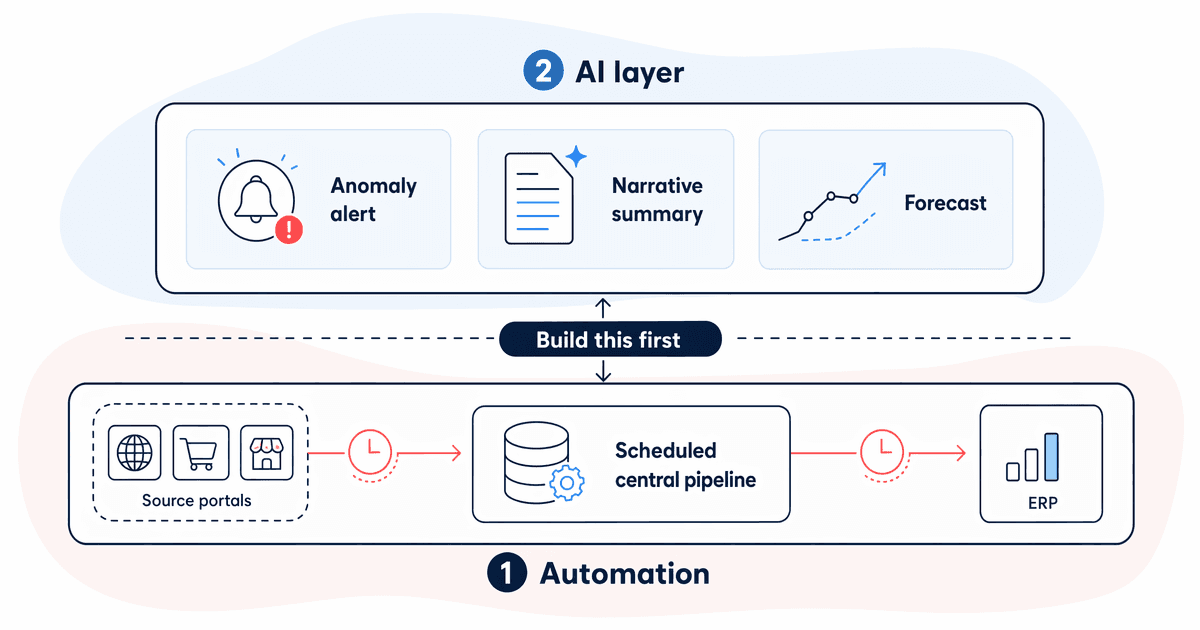
Citation capsule:FMCG reporting automation replaces manual copy-paste with scheduled data pulls, producing identical outputs without human intervention. BCG (June 2026) found only 18% of CPG companies have scaled AI, with most stuck at the data foundation phase — demonstrating that reliable automation is a prerequisite for AI, not an alternative to it.
Step 1: Map the current process
Before touching any tool or system, draw the process. It doesn't need to be formal. A whiteboard photo works. The goal is to answer four questions: who touches the reporting pack, what are all the data sources, how often does each one update, and where do errors actually occur?
We've done this exercise with brands who were convinced their process was straightforward. The whiteboard usually reveals something they'd forgotten: a broker spreadsheet emailed in on Fridays, a margin calculation that only one person knows how to do, a retailer portal that sends a PDF instead of an exportable file.
Identifying which sources are blockable
Not all data sources are equally tractable for automation. The key distinction is between API-enabled sources and file-based sources.
API-enabled or structured-export sources are automatable with standard tools. Most ERP systems support scheduled exports or have direct integrations available. Tesco TRS, Sainsbury's S4S, Asda InfoBay, and Morrisons IQNetworks all have structured data available, though the access mechanism varies by portal and by the brand's commercial agreement.
PDFs and email attachments are hard. They require optical character recognition or manual parsing, and they break every time the format changes. If a broker sends you a PDF summary every Friday, that source goes to the bottom of the automation priority list. Don't let it block everything else.
What to capture on the process map
- Every data source: name, format, update frequency, who accesses it
- Every manual step: copy, paste, formula, lookup
- Every known error location: the formula that breaks when column headers shift, the ERP extract that sometimes includes duplicates
- The single point of failure: who owns the master file and what happens when they're unavailable
This map becomes the basis for everything that follows. An hour on a whiteboard saves weeks of debugging later.
Related: what makes a useful FMCG analytics dashboard
Step 2: Pick the highest-leverage connection first
The most common mistake in reporting automation projects is trying to automate everything simultaneously. Six sources become six half-done connections, none reliable enough to trust, and within three months the manual pack is back.
Pick one source. Usually the right choice is either the ERP or the biggest retailer portal. The ERP wins if it's the source of most downstream calculations. A retailer portal wins if its data is the most time-consuming to pull and has the cleanest export format.
The pattern we see most often: brands that start with ERP automation get their first clean automated connection working in 2–3 weeks. Brands that start with a retailer portal take slightly longer because portal interfaces vary and some require browser automation to trigger exports. Either way, one clean connection beats six partial ones by a significant margin.
Why single-source focus works
Starting with one source gives you a proof of concept without betting the whole project on everything working at once. It gives the team confidence. It surfaces integration problems early, when they're cheap to fix. And it produces something tangible — a scheduled, reliable data pull that people can see working — which is essential for maintaining internal support for the project.
Don't move to source two until source one has been running reliably for at least two weeks. "Reliably" means the scheduled pull runs on time, the data matches expectations, and nobody has had to manually intervene.
Related: data readiness and what "clean enough" means before connecting sources
Step 3: Build the connection, not the dashboard
This is the step where most teams go wrong. They get excited about what the dashboard will look like and skip the unglamorous work of building a clean, structured data pipeline first.
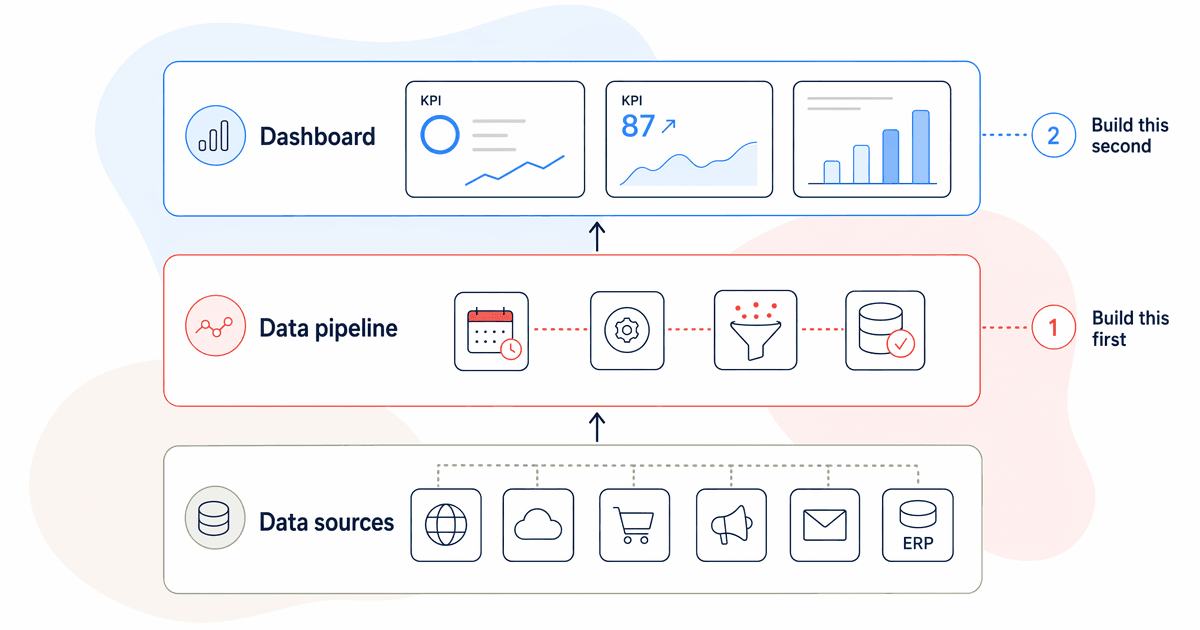
The data pipeline is the foundation. A scheduled pull that deposits clean, consistently structured data into a spreadsheet, a simple database, or a cloud storage location is the deliverable for this step. Not a chart. Not a visual. Just reliable, structured data that arrives on schedule.
What "clean, structured data" means here
The output of your data pipeline should meet three criteria. Field names must be consistent — if your ERP calls it "product_code" and your retailer portal calls it "sku_id", the pipeline maps them to one standard name before anything hits the destination. Definitions must be agreed — does "revenue" mean gross or net? This has to be explicit in the pipeline logic, not assumed. And the refresh schedule must be predictable — the pipeline runs at the same time, every time, and fails loudly if something goes wrong rather than silently producing stale data.
The dashboard is just a display layer on top of this foundation. Once the pipeline is solid, building the visualisation is the straightforward part. It's fast, it can be changed easily, and anyone can do it. Getting the pipeline wrong makes the dashboard unreliable regardless of how well it's designed.
Related: what makes a useful FMCG analytics dashboard
Step 4: The trust-building phase (the one most teams skip)
Once the automated pipeline is running, run it in parallel with the manual pack for four weeks. Every discrepancy gets investigated. Not accepted, not explained away. Investigated.
This step sounds tedious. It is tedious. It's also the reason some teams have reliable dashboards eighteen months later and other teams abandoned theirs after three months.
We've seen this go wrong in a specific way: a discrepancy appears in week two, someone explains it as "a timing difference in how the portal updates" and the team moves on without verifying that explanation. Three months later, the dashboard is showing numbers nobody trusts, the manual pack is back, and the project is written off as a failure. The timing difference was real — but it was masking a mapping error that made every subsequent week's data slightly wrong.
What to do when numbers don't match
Don't assume the automated version is wrong. Don't assume the manual version is right. Trace both versions back to the raw source data and find where they diverge. Common causes:
- Timing differences:The portal refreshes at 6am; the manual pull was done at 8pm the day before. One day's sales are in one version but not the other.
- Definition mismatches:The ERP export includes returns in the revenue figure; the manual pack excluded them. Neither is wrong — they're just measuring different things.
- Mapping errors:A product code that appears in two formats gets counted twice in one version, once in the other.
Each of these is fixable. None of them are catastrophic. But you need to find and fix them during the parallel-run phase, not after you've decommissioned the manual pack and the errors are in the board pack.
Step 5: Adding AI on top of a reliable pipeline
Once the data pipeline has run cleanly for four weeks with no unexplained discrepancies, you have the foundation for AI-assisted reporting. This is where the work starts paying dividends beyond time savings.
The three AI additions that deliver the most value in FMCG reporting, in rough priority order, are anomaly alerts, narrative summaries, and forecast tracking. UnifyApps (May 2026) found that AI-driven financial reconciliation delivers up to 75% faster reconciliation and up to 40% faster close cycles — results that depend entirely on having reliable automated data pipelines underneath.
Anomaly alerts
An anomaly alert flags when something in the data looks unusual. A SKU that sold 40% below its 4-week average. A retailer where availability has dropped unexpectedly. A promotional week where the uplift is below the threshold you'd normally expect.
This isn't AI making decisions. It's AI doing the monitoring so that humans spend time on exceptions rather than scanning tables for things that look wrong. For a brand running 10–15 promotions per month across four retailers, that monitoring work would otherwise consume most of a commercial analyst's week.
Narrative summaries
Auto-generated weekly commentary reduces the time between "data refreshed" and "insight shared with the team." A simple narrative layer can produce a first-draft summary: which SKUs over-performed, which retailers are trending down, what the promotional return looked like versus the forecast.
The first draft won't always be right. It doesn't need to be. It needs to be a useful starting point that someone can review and amend in 15 minutes rather than write from scratch in 90 minutes.
Forecast versus actual tracking
Once you have a reliable automated pipeline pulling actuals on a schedule, you can compare them directly against your demand forecast. Variances appear automatically. The conversation shifts from "what happened?" to "why did it happen?" and "what do we do about it?"
This is the step where finance and reporting use casesstart connecting to operational decisions. Persistent underperformance versus forecast triggers a range review conversation. Persistent over-performance triggers a supply planning conversation. Neither happens fast enough in a manual reporting environment.
Related: the complete picture of AI applications across FMCG functions
Manual versus automated reporting: a direct comparison
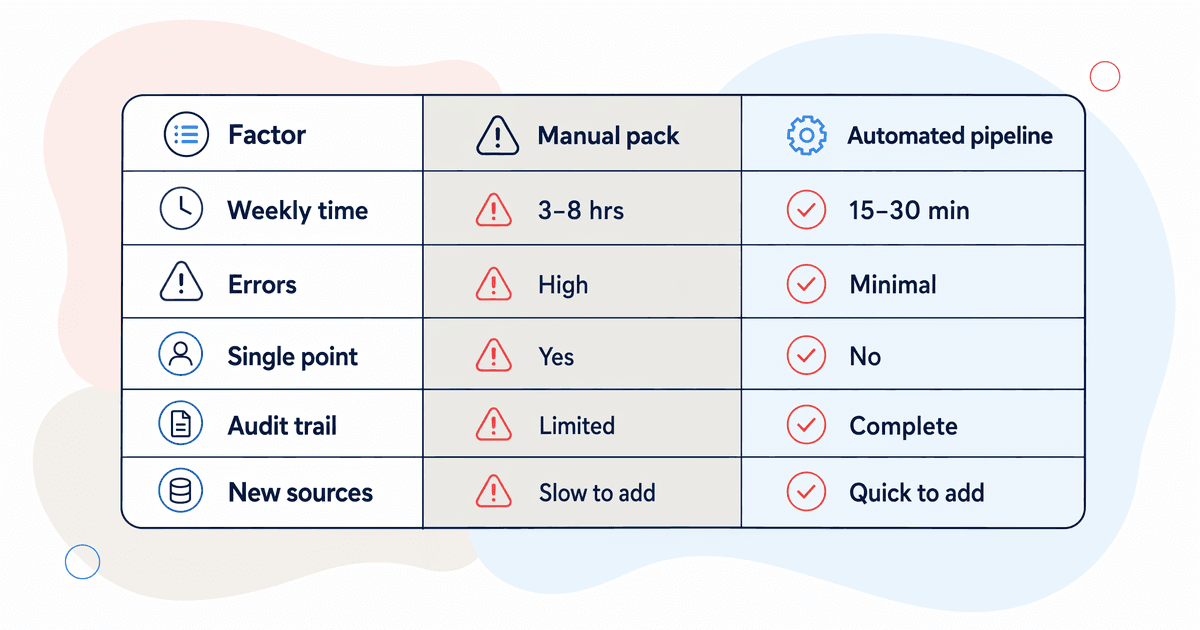
| Factor | Manual Pack | Automated Pipeline |
| Time per week | 3–8 hours of assembly work | 15–30 minutes review time |
| Error rate | Copy-paste and formula errors in every weekly cycle | Errors fixed once at pipeline level; don't recur |
| Single point of failure | One person holds the process knowledge | Runs on a schedule regardless of who's in the office |
| Audit trail | Previous versions depend on file saves and version control discipline | Every pull logged with timestamp and source reference |
| Adding new data sources | Each new source adds proportional manual work | New connection added to pipeline; display updates automatically |
The time saving alone — 3–8 hours per week returned to analysis rather than assembly — justifies the project for most brands. But the single point of failure row is often what actually drives the decision. When a key person is unavailable and the business has no numbers for three days, that's when ops directors stop treating this as a "nice to have."
Citation capsule:Automated FMCG reporting pipelines reduce weekly assembly time from 3–8 hours to 15–30 minutes of review, eliminate recurring copy-paste errors, and remove single-person dependency on process knowledge. BCG (June 2026) notes only 18% of CPG companies have scaled AI, with data pipeline reliability cited as the primary prerequisite that most organisations have yet to establish.
FAQ
How long does FMCG reporting automation actually take to implement?
For a single data connection — one retailer portal or ERP export — expect 2–4 weeks from process map to working automated pull. The full stack, covering multiple retailer portals and ERP, typically takes 8–14 weeks. The trust-building phase adds another 4 weeks and should not be skipped. Rushing past it is the most common reason automation projects get abandoned.
Which retailer portals support automated data connections?
Tesco TRS, Sainsbury's S4S, Asda InfoBay, and Morrisons IQNetworks all support structured data exports. The access mechanism varies: some require browser automation to trigger downloads, others support scheduled file exports. PDFs and emailed attachments are significantly harder and worth deprioritising. Start with whichever portal has the cleanest structured export available under your commercial agreement.
Why do automated dashboards get abandoned after a few months?
Almost always because the trust-building phase was skipped. A discrepancy appears early on, it gets explained away rather than investigated, and the underlying issue quietly corrupts subsequent weeks of data. Once the team notices the numbers don't match their expectations, the old manual pack comes back. Four weeks of parallel running, with every discrepancy traced to root cause, prevents this entirely.
Related: the full landscape of AI tools and approaches for FMCG
Sources
- BCG (June 2026). "How CPG and Retail Leaders Maximize AI ROI." bcg.com
- Deloitte (January 2026). "State of Generative AI in the Enterprise." deloitte.com
- UnifyApps (May 2026). "AI-driven reconciliation delivers up to 75% faster processing and 40% faster close cycles." unifyapps.com