
Most FMCG businesses are at one of two extremes. Either everything lives in Excel and nobody's quite sure which version is current, or someone built a 40-tab Power BI report two years ago that takes 20 minutes to load and gets opened once a quarter. Neither is useful.
The useful middle ground — a dashboard that actually changes what your team does on a Monday morning — exists, and it's less complicated to build than either extreme suggests. The problem is that most people design dashboards around data they have rather than decisions they need to make.
This post answers the questions ops directors and founders actually ask about FMCG analytics dashboards: what to show, how often to refresh it, what it costs, and when AI makes sense. No vendor comparisons, no feature matrices. Just the practical guidance.
Related: when spreadsheets become the bottleneck
The Bottom Line: - 75% of CPG companies are still in "perpetual pilot" with data and AI tools, never reaching scaled deployment (BCG, June 2026) - Four metrics drive 80% of operational decisions in mid-market FMCG: service level, inventory position, sales vs forecast, and promo performance - Dashboard cost lives in data connections, not visualisation tools - most brands don't need more than £500/month to start - AI belongs on top of a working dashboard, not underneath a broken one
What Should an FMCG Analytics Dashboard Actually Show?
Four metrics cover the operational decisions that matter most for food and drink brands in the £20m-£150m range. Service level and fill rate vs target, inventory position by SKU vs min/max, weekly sales vs forecast by channel, and promotional performance — actual vs planned uplift. Everything else is decoration until those four are reliable and refreshing without manual effort.
<!-- -->
The pattern we see most often:Brands that have built dashboards with 15+ metrics end up making the same decisions as brands with four. The difference is that the 15-metric version creates more noise, takes longer to brief new team members on, and tends to fall apart when the person who built it leaves. Fewer metrics, agreed on by the people who use the dashboard, beat comprehensive coverage every time.
Here's what each of those four metrics actually tells you in practice.
Service level / fill rate vs targetis the clearest early warning signal in the business. A fill rate dropping from 97% to 93% at a specific retailer tells you more, faster, than any amount of sales trend analysis. Set a target (most UK grocery buyers expect 98.5%+) and flag anything below it.
Inventory position by SKU vs min/maxreplaces the question "do we have enough stock?" with a direct answer. Min/max thresholds should reflect your lead times and sales velocity. Any SKU below min is a stockout risk. Any SKU significantly above max is cash tied up unnecessarily.
Weekly sales vs forecast by channelshows where the plan is diverging from reality. The comparison needs to be at channel level, not just total brand, because a shortfall at Tesco can be masked by an overperformance at Ocado if you only look at totals. Spot the divergence early, and you have time to act.
Promotional performance — actual vs planned upliftis the most commonly skipped metric and the one with the biggest financial consequence. If a promotion delivered 12% volume uplift against a planned 25%, you need to know that before you rerun the mechanic. Most brands only do this analysis quarterly, if at all.
Related: automating your reporting process
Citation capsule:For mid-market FMCG brands, the four operational metrics that drive the majority of week-to-week decisions are service level vs target, inventory position vs min/max, sales vs forecast by channel, and promotional uplift vs plan. BCG (June 2026) reports 75% of CPG companies have not yet scaled data analytics beyond pilot programmes (BCG, 2026), suggesting most brands are still without reliable versions of these fundamentals.
How Often Should a Dashboard Refresh?
Weekly is the minimum for operational decisions. Daily is useful for service level and stockout monitoring. Real-time is rarely necessary at SME scale and adds significant infrastructure cost that most brands at this revenue range can't justify. The rule of thumb is simple: refresh frequency should match your decision frequency.
Think about how your team actually works. Service level decisions — calling a co-packer, accelerating a production run — get made daily. Inventory replenishment decisions get made two to three times a week. Promotional performance reviews happen weekly or fortnightly. There's no value in real-time inventory data if your replenishment process runs on a Tuesday and a Friday.
<!-- -->
In our experience:The brands that invest in real-time data infrastructure early almost always regret it. Not because real-time data is useless, but because the cost is in maintaining the connections, not building them. A daily refresh that's always reliable beats a real-time feed that breaks every third week and takes two hours to diagnose.
Start with weekly. Once the weekly refresh is reliable and your team is acting on it, move specific metrics to daily if the decision cadence justifies it. That sequencing matters. Reliability before frequency.
What's the Difference Between a Report and a Dashboard?
A report answers "what happened". A dashboard asks "what needs attention now". The distinction sounds subtle, but it changes everything about how you design the thing. Reports present data. Dashboards surface exceptions.
A 900-row sell-out report from Tesco TRS is a report. The same data processed to show you "3 SKUs fell below 90% fill rate this week — action required" is a dashboard. The underlying data is identical. What differs is whether the human has to find the signal in the noise, or whether the system does that work first.
The most useful FMCG analytics dashboards flag three to five things per week that need attention, not three to five hundred numbers that are mostly fine. If someone has to spend 20 minutes reading your dashboard to find what to do, it's a report in disguise.
This distinction also explains why most off-the-shelf BI tools deliver reports by default. Power BI, Tableau, and Looker are all excellent at making data visible. They're neutral on whether that data is signal or noise. Building a dashboard that genuinely surfaces exceptions requires someone to define what "out of normal" looks like first, which brings us to one of the main reasons dashboards fail.
Related: data quality
Citation capsule:An FMCG analytics dashboard differs from a report in its purpose: dashboards surface exceptions requiring action, while reports present historical data for review. Schneider Electric (April 2026) found that 36.3% of CPG executives cite lack of contextualised operational data as a blocker to acting on analytics (Schneider Electric, 2026) — a problem dashboards can solve if designed around decisions rather than data coverage.
What Data Sources Does an FMCG Dashboard Need?
Five source types cover most mid-market FMCG operations: your ERP or inventory system, retailer POS portals (Tesco TRS, Sainsbury's S4S, Asda InfoBay, Morrisons IQNetworks), your promotional calendar, your financial system, and for direct-to-consumer channels, your ecommerce platform. You don't need all of them connected at launch. Start with the one that drives the most decisions.
For most UK food and drink brands, that means the ERP and one or two retailer portals first. Those two sources together give you enough to build reliable service level and inventory views. The promotional calendar adds context for performance analysis. Financial data links to margin. Build in that order.
A few practical points on the retailer portals specifically:
- Tesco TRS(Trading Relationship System) updates weekly and covers sales, availability, and replenishment data. The export format is consistent, which makes it easier to connect.
- Sainsbury's S4Sprovides similar data but with a slightly different field structure. Mapping the two takes an afternoon.
- Asda InfoBayand Morrisons IQNetworksare less standardised and more manual to extract from, but the data is there if you need it.
The connectors for these portals are the expensive part of most dashboard builds, not the visualisation layer. If a supplier quotes you £50,000 for a "data analytics platform," the majority of that cost is in the API connections and scheduled exports, not the charts.
Related: clean enough data
Why Do Most FMCG Dashboards Fail?
Three failure modes account for the majority of abandoned dashboards. The dashboard was built for the analyst who built it, not for the ops director who was supposed to use it. The refresh depends on a manual upload from one person, and when that person leaves, the dashboard goes dark within weeks. Nobody agreed on what "good" looks like, so there's no baseline to compare against and no way to know when a number needs attention.
The first failure mode is the most common. Analysts build dashboards that answer the questions they find interesting. Ops directors need dashboards that answer the questions they're asked every Monday. Those two sets of questions are rarely identical. The fix is to design the dashboard starting from the decision, not the data.
The second failure mode is a structural problem, not a people problem. Any dashboard that requires human intervention to refresh will eventually stop refreshing. This applies whether the intervention is uploading a file, running a script, or copy-pasting from a portal. Automation isn't a nice-to-have — it's the only way a dashboard stays alive.
The third failure mode is the quietest. If your fill rate is showing 94.2% and nobody agreed whether 95% is good or bad, the number is decorative. Targets and thresholds need to be documented alongside the metrics themselves, agreed on by the people who make decisions based on them.
<!-- -->
What we've seen:The pattern across projects we've run: dashboards built by IT teams with minimal ops input last an average of 2-3 months before they're quietly replaced by a spreadsheet. Dashboards co-designed with the ops director, starting from a list of the five questions they get asked most often, are still running 18 months later.
Citation capsule:FMCG analytics dashboards most commonly fail due to three structural issues: being built for the builder rather than the user, requiring manual data uploads that create fragility, and lacking agreed baselines for what constitutes good or poor performance. BCG (June 2026) reports 75% of CPG companies are stuck in perpetual pilot with analytics tools (BCG, 2026) — a figure consistent with dashboards that never reach reliable operational use.
How Much Does an FMCG Analytics Dashboard Cost?
The cost range is wide: £0 for a well-structured Google Sheets setup through to £500-£2,000 per month for Power BI with live data connectors and ongoing maintenance, and £2,000+ per month for advanced builds with multiple integrated sources and predictive features. The visualisation tool is almost never the expensive part. The cost is in the data connections.
Most mid-market food and drink brands don't need a six-figure data warehouse. They need their existing data sources connected reliably and refreshing on a schedule. A £200/month Power BI licence with three well-built connectors will outperform a £150,000 enterprise analytics platform if the connectors work and the metrics match the decisions.
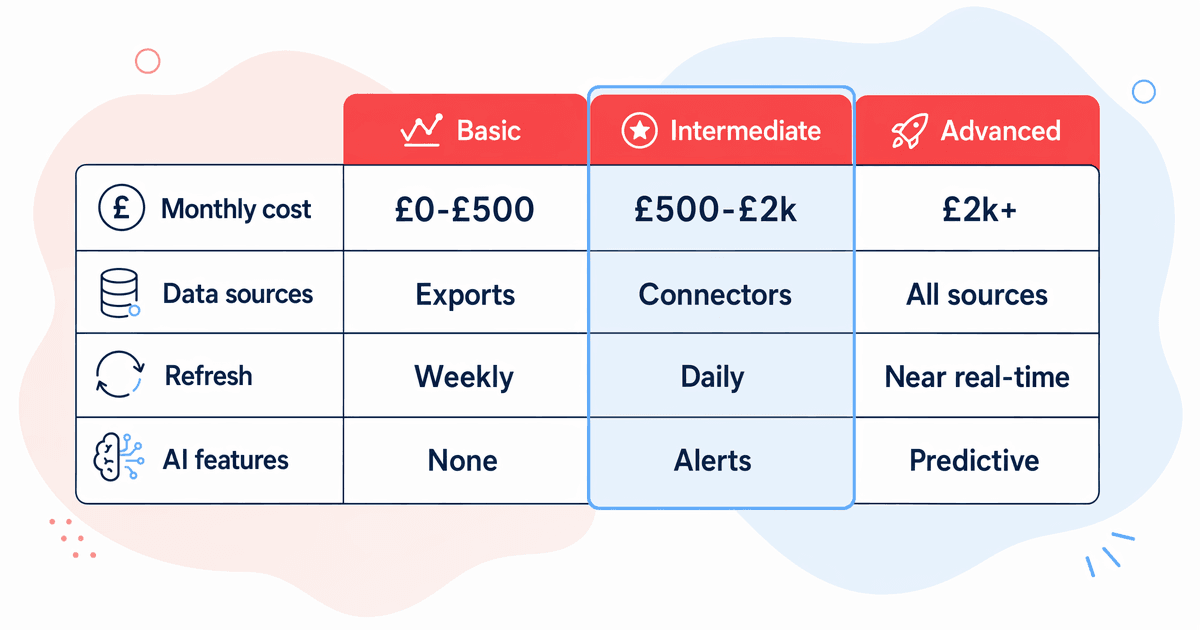
| Tier | Monthly Cost | Data Sources | Refresh | AI Features |
| Basic | £0-£500 | ERP export + 1-2 retailer portals (manual download) | Weekly, manual upload | None |
| Intermediate | £500-£2,000 | ERP + 3-4 retailer portals (automated connectors) + promo calendar | Daily automated | Anomaly alerts, variance flags |
| Advanced | £2,000+ | All of the above + financial system + ecommerce + demand signal feeds | Near real-time | Predictive stock risk, AI narrative summaries, anomaly detection |
A word on the Basic tier: there's nothing wrong with it as a starting point. A well-structured Google Sheet with agreed metrics, clear targets, and a consistent weekly update discipline will outperform a poorly designed Power BI dashboard at any cost level. Don't let perfect be the enemy of useful.
Related: automating your reporting process
When Should I Add AI to My Dashboard?
Add AI only after the underlying data is reliable and refreshing automatically. This isn't a conservative position — it's a practical one. AI adds genuine value in three specific areas: anomaly alerts that flag unexpected variances before you spot them manually, narrative summaries that auto-generate weekly commentary on performance, and predictive elements like stock risk alerts based on current sell-through rates and lead times.
None of those features work if someone is still manually uploading data every Monday. An anomaly alert on manually uploaded data means you're getting an automated flag about a number a human already touched. Predictive stock alerts based on week-old data are predictions about the past.
BCG (June 2026) found that 75% of CPG companies are still in perpetual pilot rather than scaled deployment of AI and analytics tools (BCG, 2026). We'd argue that a substantial share of those stalled pilots involve AI features built on top of unreliable data infrastructure. It's decorating a broken foundation.
The sequencing that works:
- Agree on four to six core metrics and what "good" looks like for each
- Connect the data sources and automate the refresh
- Run the basic dashboard for 4-8 weeks to establish a reliable baseline
- Add exception alerts once you trust the underlying numbers
- Add AI features — narrative summaries, predictive signals — once the exceptions are consistently accurate
If you're at step one or two, AI isn't the next investment. Reliable data is. That's a less exciting answer, but it's the one that leads to a dashboard still in use 18 months from now.
Related: complete guide to AI for FMCG
Citation capsule:AI features on FMCG analytics dashboards deliver value only when underlying data is reliable and auto-refreshing. Schneider Electric (April 2026) found 36.3% of CPG executives cite lack of contextualised operational data as an AI adoption blocker (Schneider Electric, 2026) — confirming that data infrastructure, not AI capability, is the real gating factor.
Frequently Asked Questions
What should an FMCG analytics dashboard show first?
Start with four metrics: service level vs target, inventory position by SKU vs min/max, weekly sales vs forecast by channel, and promotional performance vs planned uplift. These four cover the decisions that drive the most operational value. Add other metrics only once these are reliable and refreshing automatically. Complexity before reliability is the most common dashboard mistake.
How do I know if my dashboard is actually useful?
If your team opens it on Monday morning before checking email, it's useful. If it gets opened once a fortnight or only before the S&OP meeting, it isn't doing its job. A useful FMCG dashboard flags three to five things that need action each week. If the answer to "what does the dashboard tell you to do?" is "I need to spend time reading it to find out," redesign it around exceptions rather than data completeness.
What's the minimum viable FMCG dashboard setup?
A Google Sheet or Excel workbook with agreed metrics, clear targets shown alongside actuals, colour-coded exception flags, and a consistent weekly update. This costs £0 and outperforms most enterprise BI tools if the discipline around updating it exists. The limitation is that manual update discipline tends to erode. Automating your reporting processremoves that dependency.
Should I build the dashboard in-house or use a tool?
For most mid-market brands, a combination: use Power BI, Looker Studio, or Google Sheets as the visualisation layer (all available at low or zero cost), and invest in the data connections rather than custom-built software. Custom-built dashboards are harder to maintain, harder to hand over, and tend to become single points of failure when the developer moves on.
How do I convince my team to use a new dashboard?
Design it with them, not for them. Spend one session asking: what are the five questions you get asked most often? What do you spend the most time finding out on a Monday? Build the first version around those answers. A dashboard that answers real, recurring questions gets used. A dashboard that answers theoretical questions about the business gets ignored.
Related: AI readiness assessment
The Short Version
Most FMCG analytics dashboards fail for the same reasons: too many metrics, no agreed baseline for what "good" looks like, and a manual refresh step that breaks the moment the person responsible has a busy week.
The useful version is simpler than most brands think. Four core metrics, refreshing automatically, with clear targets and exception flags. That setup, at any cost level from £0 to £2,000/month, will change how your team runs Monday mornings. Add AI features once those fundamentals are solid, not before.
If you're unsure whether your current data setup is ready for any of this, the AI readiness assessmentcovers the data quality questions that matter most before building anything.
Sources for this article include BCG (June 2026), Schneider Electric (April 2026), and BazBiff observed patterns across UK food and drink brand engagements. All statistics are cited inline.