
You know your systems don't talk to each other. The ERP doesn't sync with the warehouse. Retailer data gets manually exported. The demand plan lives in a spreadsheet someone emails around on Mondays. According to Schneider Electric (2026), 37.5% of CPG executives cite legacy automation systems as a primary blocker to operational improvement. You're not alone.
The question isn't whether to integrate. It's what to connect first, and in what order. Get the sequence wrong and you'll create dependencies that block future work, burn budget on integrations you'll rip out when you change systems, and frustrate the team. Get it right and each connection makes the next one easier.
practical guide to AI for FMCG
This guide walks through the exact sequencing approach we recommend for UK food and drink brands between £20m and £150m revenue. No theory, just the steps.
The Bottom Line - Start with ERP-to-reporting, not the hardest integration - Each integration should save measurable hours or reduce known errors - 75% of CPG firms get stuck in perpetual pilots by trying too much at once (BCG, 2026) - Budget for maintenance: every integration needs ongoing attention - The right sequence builds momentum. The wrong one creates blockers.
Why Does FMCG System Integration Sequencing Matter?
Budget is limited. Internal bandwidth is limited. According to BCG (2026), 75% of CPG and retail firms remain stuck in perpetual pilots, unable to scale beyond initial projects. The pattern we see most often: a brand tries to connect everything at once, nothing gets finished properly, and the team loses confidence in the whole idea.
Citation capsule: BCG's June 2026 research found that 75% of CPG and retail companies remain stuck in perpetual pilots when attempting digital initiatives, primarily because they pursue too many projects simultaneously without a clear sequencing strategy (BCG, 2026).
Every integration needs testing, documentation, and ongoing maintenance. It's not a one-off project. If you integrate your warehouse system to an ERP you're planning to replace in 8 months, that's wasted effort. If you start with the hardest connection first and it takes 4 months, you've lost internal support before delivering any value.
We've seen brands spend six figures connecting a legacy ERP to a warehouse management system, only to migrate the ERP 12 months later. The integration became worthless. Sequencing isn't just about what's most important, it's about what's most important right now given your roadmap.
The right sequence follows a pattern: start with high-visibility, low-complexity integrations that prove the concept internally. Then move to the connections that save the most manual time. Save the complex, mission-critical integrations for when you've built the muscle.
Step 1: How Do You Map Your Current System Landscape?
Most UK food and drink brands at £30m-£100m revenue run between 6 and 12 systems that hold business-critical data. A Schneider Electric (2026) survey found that 36.3% of CPG executives identify lack of contextualised operational data as a key barrier. That lack of context almost always traces back to disconnected systems.
Citation capsule: Schneider Electric's 2026 study found 36.3% of CPG executives cite lack of contextualised operational data as a key barrier to operational improvement, a problem directly caused by disconnected systems that store data without sharing it across functions (Schneider Electric, 2026).
List every system that holds or produces data someone uses for decisions. For a typical brand in this revenue range, that looks like this:
Typical System Landscape for a £30m-£100m Food and Drink Brand
| Function | Common Systems | Data Format |
| ERP / Accounts | Sage 200, Xero, NetSuite | Structured, API usually available |
| Warehouse / Inventory | Manual spreadsheets, Unleashed, Dear Systems | Varies widely |
| Retailer Portals | Tesco TRS, Sainsbury's Supplier Hub, Asda | CSV exports, PDFs, web portals |
| Production Scheduling | Paper, Excel, Redzone | Often unstructured |
| Demand Planning | Excel spreadsheet | Manual, formula-dependent |
| Financial Reporting | Excel assembled weekly | Manual compilation |
| CRM / Sales | HubSpot, Salesforce, spreadsheet | Usually API-accessible |
Don't skip this step. You can't prioritise what you haven't mapped. Spend half a day with your ops and finance leads documenting what lives where. Note which systems have APIs, which export CSV, and which require manual copy-paste.
Step 2: Where Is Your Biggest Pain Point?
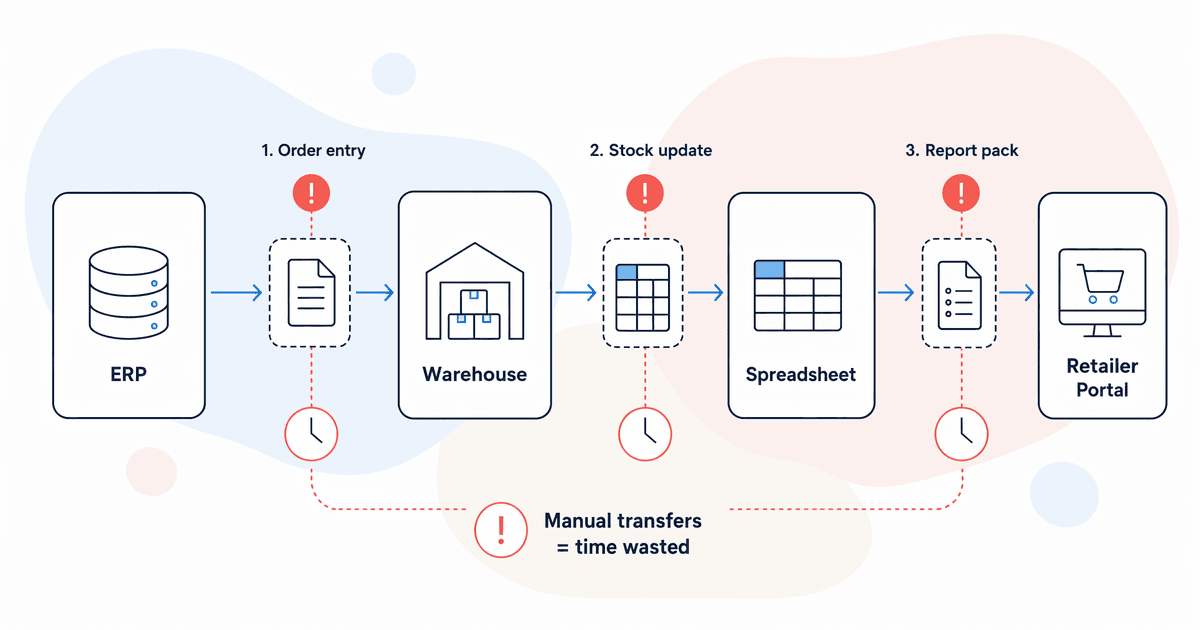
The most impactful first integration isn't always the most obvious one. Look for where your team spends the most manual time transferring data between systems, where errors creep in, and where delays create knock-on problems downstream.
Ask three questions of every system boundary:
- How many hours per week does someone spend moving data from system A to system B?
- What errors occur when that transfer goes wrong? What's the cost?
- Who's blocked waiting for that data to arrive?
Common Pain Points in Food and Drink Operations
The answers we hear most often fall into these categories:
- Retailer sales data into demand plan: Someone downloads CSVs from 3-5 retailer portals every Monday, reformats them, and pastes into a demand spreadsheet. Time: 3-8 hours per week. Error rate: high.
- Production output into inventory records: The warehouse team manually keys finished goods quantities. Discrepancies between WMS and ERP are discovered at month-end.
- Purchase orders into goods receipt into accounts payable: Paper-based or email-based PO workflows that require triple handling.
In our experience working with UK FMCG brands, the retailer-data-to-demand-plan boundary is the most common first pain point. But it's rarely the best first integration because retailer data is messy, inconsistent across portals, and changes format without warning.
Step 3: How Do You Assess Integration Complexity?
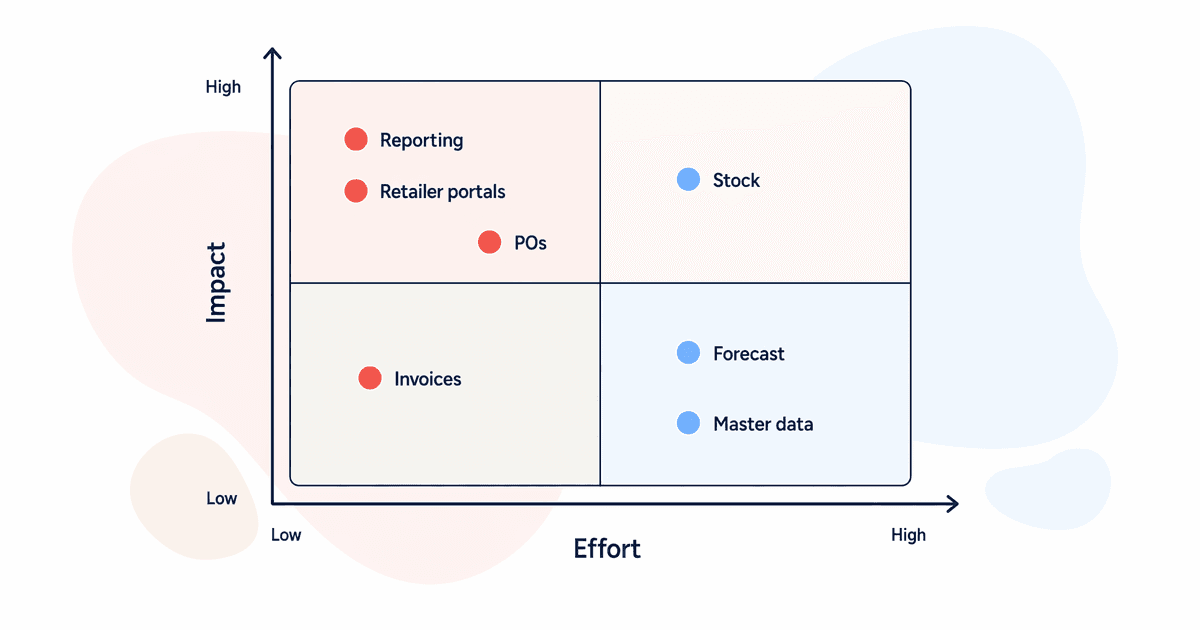
Not all integrations are equal. Some take two weeks. Some take six months. Score each potential integration on four dimensions before you commit budget. The goal is finding the sweet spot: high impact, manageable complexity.
Integration Scoring Framework
| Dimension | Score 1 (Easy) | Score 3 (Hard) |
| Data source accessibility | Modern API, well-documented | No API, PDF/scraping required |
| Frequency needed | Weekly batch | Real-time or near-real-time |
| Volume | Under 1,000 records/day | Over 50,000 records/day |
| Internal skill to maintain | Team can handle middleware | Requires dedicated developer |
Add the scores. Anything scoring 4-6 is a good early candidate. Anything scoring 9-12 should wait until you've built integration experience.
We've found that "internal skill to maintain" is the dimension most brands underestimate. An integration is a living thing. APIs change. Data formats drift. If nobody on your team can troubleshoot it when it breaks on a Friday afternoon, you've got a support dependency that costs more than the integration saved.
Does it sound like overkill to score each one? It isn't. We've seen brands skip this step and jump straight to the integration that the loudest stakeholder requested. That usually means starting with something complex, running into delays, and shelving the whole programme.
Step 4: What's the Recommended Integration Sequence?
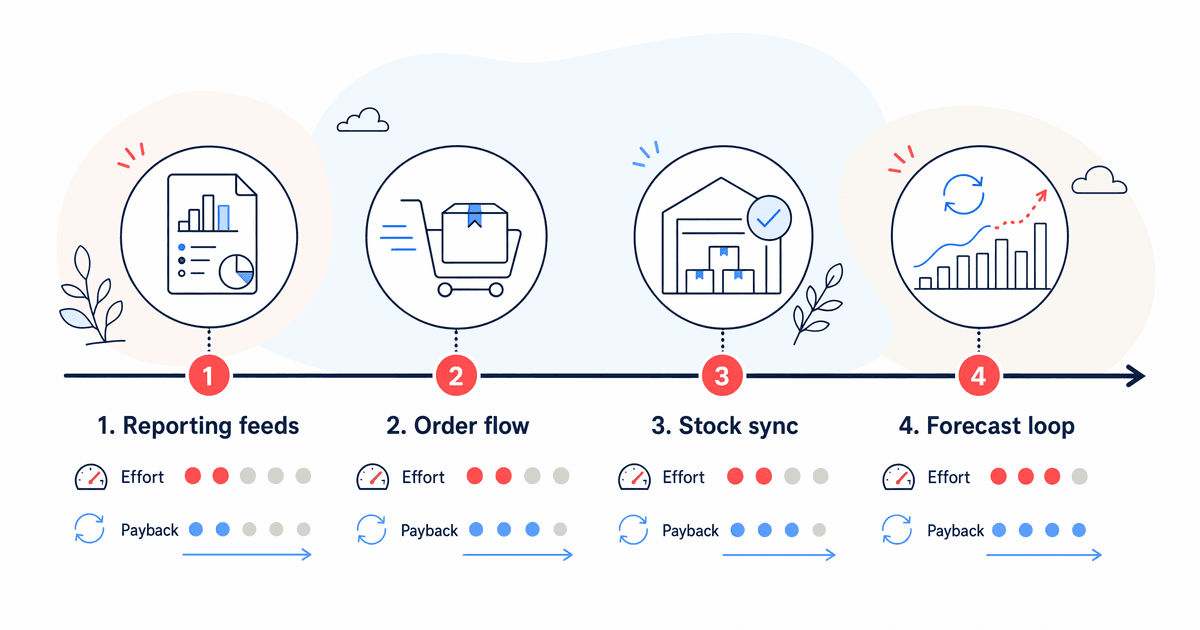
For most UK food and drink brands in the £20m-£150m range, this sequence works. It builds from low complexity to high, from quick wins to strategic capabilities. Each step creates foundations the next one uses.
First: ERP to Financial Reporting
Why first: Leadership cares about it. The data is structured. Modern ERPs (even Sage 200) have APIs or export capabilities. You can show ROI within weeks.
What it looks like: Automated daily or weekly pull from your ERP into a reporting dashboard. No more manually assembling Excel packs every Friday.
Typical time saved: 4-6 hours per week for the finance team.
Second: Retailer Data into a Consolidated View
Why second: Saves 3-8 hours per week of manual downloading and reformatting. Gives you a single view of sell-out performance across retailers.
What it looks like: Scheduled pulls from retailer portals (or their data feeds where available), normalised into a consistent format, visualised in one place.
Watch out for: Retailer portals change their export formats. Build with flexibility.
Third: Inventory/Warehouse to ERP
Why third: Reduces stock discrepancies that cause over-ordering or stockouts. Requires more trust in data quality on both sides.
What it looks like: Real-time or daily sync between warehouse counts and ERP stock records. Automated goods receipt posting.
Fourth: Demand Plan Inputs from Sales Data
Why fourth: This enables future AI forecasting. But it's only useful if you've already got clean retailer data (step 2) and accurate inventory (step 3) feeding in.
What it looks like: Automated data feeds from your consolidated retailer view and inventory system into your demand planning tool or model.
The Priority Matrix
| Integration | Impact (1-5) | Effort (1-5) | Recommended Order | Typical Weekly Hours Saved |
| ERP to financial reporting | 4 | 2 | 1st | 4-6 hrs |
| Retailer data consolidation | 5 | 3 | 2nd | 3-8 hrs |
| Inventory/WMS to ERP | 4 | 3 | 3rd | 2-4 hrs (plus error reduction) |
| Demand plan inputs | 5 | 4 | 4th | 2-3 hrs (plus forecast accuracy) |
| PO to goods receipt to AP | 3 | 3 | 5th | 2-5 hrs |
| Production scheduling to ERP | 4 | 5 | 6th | Depends on current process |
| CRM to order management | 3 | 2 | Opportunistic | 1-2 hrs |
Step 5: Should You Build, Buy, or Connect?
For each integration in your sequence, you've got three options. The right choice depends on data volume, complexity, and how long you expect both systems to be in place. In our experience, brands default to custom development too quickly because it feels more "solid." Often, middleware handles 80% of the requirement at 20% of the cost.
Decision Framework
Native connectors (cheapest, least flexible) Use when: Both systems have a pre-built integration. Example: Xero to a reporting tool like Fathom. Cost: typically included in subscription or under £100/month.
Middleware: Zapier, Make, or Celigo (mid-range) Use when: You need to connect two systems that don't have native connectors, data volumes are moderate (under 5,000 records/day), and the logic is straightforward. Cost: £50-£500/month depending on volume.
Custom development (expensive, most flexible) Use when: High volumes, complex transformation logic, real-time requirements, or when one system has no API and needs scraping or file-based integration. Cost: £5,000-£30,000+ build, plus ongoing maintenance.
Quick Decision Tree
- Do both systems have a native connector? Use it.
- If not, is the data volume under 5,000 records/day with simple mapping? Use middleware.
- If not, you're into custom territory. Budget for 3-6 months of build and test.
How do you avoid over-engineering? Start with the simplest option that meets 80% of the requirement. You can always upgrade later. A Zapier integration running today beats a custom integration that's still in development three months from now.
What Should You Avoid When Sequencing Integrations?
Mistakes in sequencing cost more than just the failed integration. They cost you internal credibility and slow down everything that follows. 75% of CPG firms get stuck in perpetual pilots (BCG, 2026), and poor sequencing is a major contributor to that pattern.
The Five Things Not to Do
Don't start with the hardest integration. If your first project takes six months and hits every possible obstacle, you'll struggle to get budget for the second. Start with something you can ship in 2-4 weeks.
Don't build custom when a connector exists. We've seen brands spend £15,000 on a custom integration between two systems that had a native connector they didn't know about. Always check first.
Don't integrate two systems if one is being replaced within 12 months. This sounds obvious but happens constantly. Before starting any integration, confirm both systems are staying for at least 18 months.
Don't skip documentation. When the person who built the integration leaves, can someone else maintain it? Document the data mapping, the error handling, and the monitoring approach.
Don't ignore maintenance budgets. Every integration needs ongoing attention. APIs change, data formats drift, edge cases surface. Budget 15-20% of the build cost annually for maintenance.
The pattern we see most often: a brand gets excited after the first successful integration, tries to run three more in parallel, and none of them get the attention they need. Sequential wins beat parallel chaos.
Frequently Asked Questions
What should be the first system integration for a growing FMCG brand?
For most UK food and drink brands between £20m and £150m, start with ERP to financial reporting. It's high-visibility (leadership sees the value immediately), usually feasible within 2-4 weeks, and builds internal confidence for harder integrations. The data is structured, ERPs generally have APIs, and the time saving is 4-6 hours per week.
How long does a typical FMCG system integration take?
A straightforward API-to-API integration typically takes 2-4 weeks including testing. Complex integrations involving legacy systems without APIs, or retailer portal scraping, can take 6-12 weeks. According to Schneider Electric (2026), 37.5% of CPG executives cite legacy systems as the primary blocker, which directly impacts timeline.
Should we use Zapier or custom development for FMCG integrations?
It depends on volume and complexity. Zapier or Make works well for simple data flows under 1,000 records per day. For high-volume production data or anything requiring transformation logic, middleware platforms like Celigo or custom development give you more control. Start simple. You can always upgrade if the integration proves its value.
Pulling It Together
FMCG system integration isn't a technology problem. It's a sequencing problem. The brands that succeed treat it as a programme with a deliberate order: prove value quickly with a low-risk first integration, build internal capability, then tackle the complex connections that enable real operational improvement.
Start by mapping your landscape. Score each integration on impact and complexity. Follow the sequence: ERP-to-reporting first, retailer data second, inventory third, demand planning fourth. Choose build/buy/connect based on volume, not ambition.
If your data readiness isn't where it needs to be, address that before integrating. Connecting two systems full of bad data just gives you bad data faster.