
Your quality coordinator is chasing BRCGS certificates by email, tracking expiry dates in a spreadsheet nobody trusts, and hoping nothing lapses before the next audit. According to Veeva's industry research, 64% of CPG companies still use a mix of digital and manual processes for quality and compliance (Veeva, January 2026). That's the majority of the industry still running supplier management the hard way.
This guide covers how to structure your approved supplier list, automate expiry alerts, and build a repeatable onboarding process. It's written for ops directors and founders at UK food and drink brands with 30-150 suppliers who can't justify a dedicated platform but need to stop firefighting certificate renewals.
The Bottom Line - 64% of CPG companies still mix digital and manual quality processes (Veeva, 2026) - Structure beats software: a well-built ASL with automated alerts handles 30-150 suppliers - Set expiry alerts at 60 and 30 days to stay ahead of BRCGS audits - Target 10 working days for new supplier onboarding end-to-end - Certificate retrieval in under 2 minutes is your audit-day benchmark
Why is supplier compliance so painful at this scale?
A typical UK food manufacturer with £20m-£150m revenue manages 30-150 active suppliers. Each supplier requires a stack of live documents: BRCGS or SALSA certificates, product specifications, allergen declarations, insurance certificates, and ethical trade statements. These documents expire on different dates throughout the year, creating a constant drip of renewal chasing that 64% of the industry still handles manually (Veeva, January 2026).
Citation capsule: According to Veeva's January 2026 industry research, 64% of CPG companies still rely on a combination of digital and manual processes for quality and compliance management, indicating widespread reliance on email-based document chasing and spreadsheet tracking for supplier certificate management (Veeva, January 2026).
The pattern we see most often: the quality coordinator who manages the approved supplier list is also responsible for customer complaints, internal audits, spec reviews, and training records. Supplier certificate chasing is the task that gets done last because it feels administrative. Then the BRCGS auditor arrives and asks to see supplier X's current certificate, and everyone scrambles.
The real cost of manual tracking
The problem isn't that people are lazy. It's that the work is genuinely tedious and the consequences of a lapse feel distant, right up until audit day. Consider what happens with 80 suppliers:
- Each has at least 3 documents with different expiry dates
- That's 240+ expiry dates to monitor
- At minimum, two chase emails per renewal (request and follow-up)
- That's 480+ emails annually just for renewals
Nobody is doing that well alongside their other responsibilities. Something slips. Usually several things slip.
What does good supplier management actually look like?
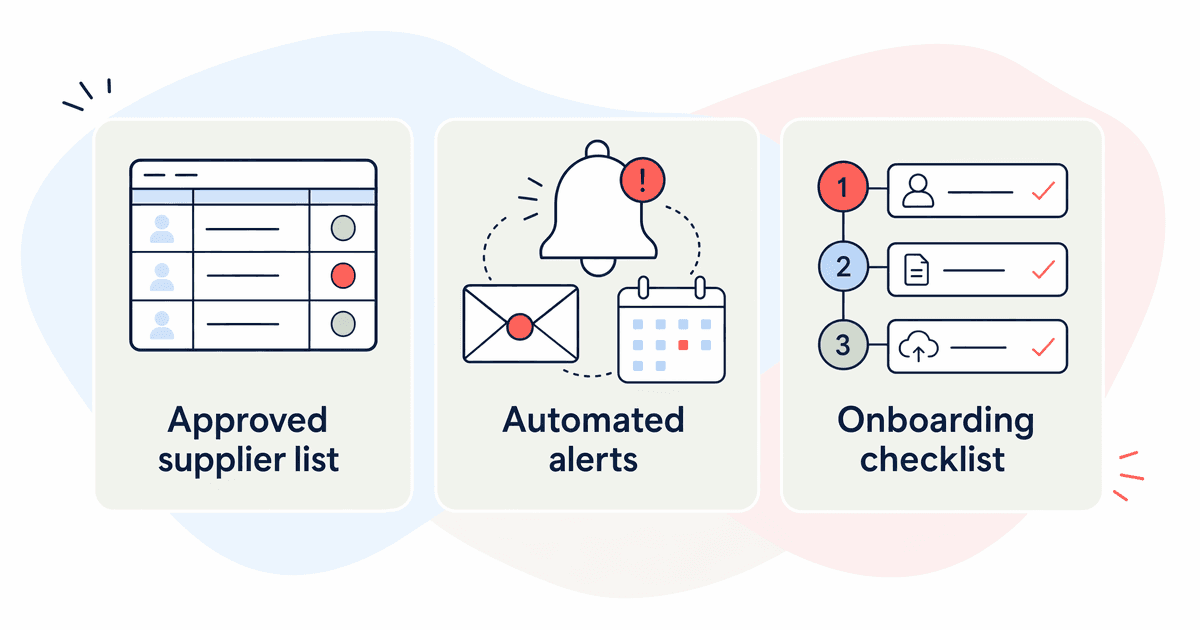
Good supplier management has three components, and none of them require expensive software. BCG's research on data foundations for CPG confirms that structured data practices, not platform purchases, drive operational results (BCG, June 2026). You need: an approved supplier list showing current status at a glance, automated alerts chasing renewals before they lapse, and a standardised onboarding checklist.
The three building blocks
1. An approved supplier list with live status. One document where anyone can see which suppliers are approved, which certificates are current, and which are approaching expiry. Traffic-light formatting: green (valid), amber (expiring within 60 days), red (expiring within 30 days or lapsed).
2. Automated expiry alerts. You're chasing renewals 30-60 days before they lapse, not discovering the problem after the fact. This can be as simple as calendar reminders or as sophisticated as automated email triggers.
3. A new supplier onboarding checklist. Every new supplier follows the same documented path. Nothing gets approved on a handshake. Nothing gets missed because someone was on holiday when the request came in.
Does this sound obvious? It should. But most brands at this scale don't have all three working consistently. They have fragments: a partial spreadsheet, some reminders in someone's calendar, a process that exists in one person's head.
How do you structure your approved supplier list?
The approved supplier list is your single source of truth for supplier compliance status. L.E.K. Consulting's research found that 45% of brand owners have now implemented connected packaging, which requires integrated supplier data flowing between systems (L.E.K. Consulting, April 2026). Your ASL is where that data starts.
Minimum fields for your ASL
Build this in a spreadsheet, Airtable, or Notion database. The tool matters less than the structure. Here are the essential fields:
| Field | Why it matters |
| Supplier name | Obvious, but use the legal entity name |
| Site address | BRCGS certificates are site-specific |
| Products supplied to you | What they actually provide |
| BRCGS/SALSA grade | AA, A, B, C, or D (plus unannounced variants) |
| Certificate number | For verification against the BRCGS directory |
| Certificate expiry date | The critical trigger field |
| Last audit date | Shows currency of the assessment |
| Insurance expiry | Public liability and product liability |
| Spec agreement date | When you last agreed product specifications |
| Allergen risk rating | High, medium, or low based on their allergen handling |
| Approval status | Approved, conditional, suspended, or new |
The critical field: certificate expiry date
This one field drives everything else. Apply conditional formatting:
- Green: expiry date more than 60 days away
- Amber: expiry date 31-60 days away
- Red: expiry date 30 days or fewer, or already expired
We've seen brands add a "days until expiry" calculated column that sorts the entire list by urgency. Simple formula. Massive improvement in visibility. The quality coordinator opens the sheet Monday morning, sees what's red and amber, and knows exactly who to chase that week.
Sort your ASL by expiry date ascending. The suppliers needing attention float to the top. No scanning, no remembering, no hoping you'll notice.
How do you automate expiry alerts?
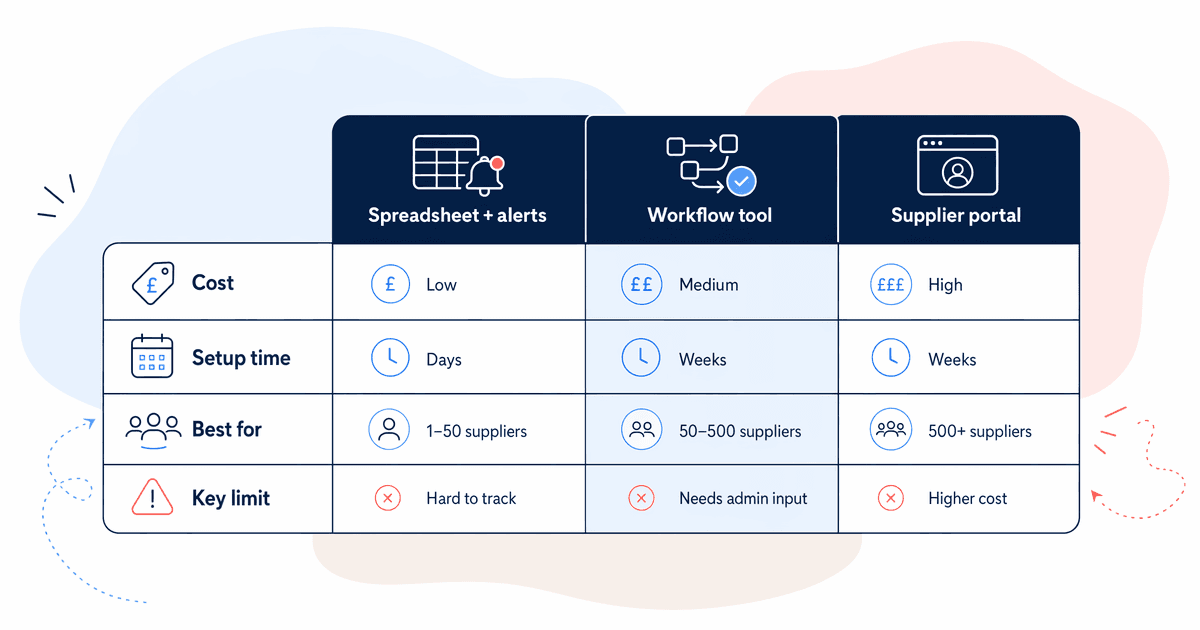
Automated alerts ensure renewals get chased before they lapse, not after an auditor flags them. The approach you choose depends on your budget and technical confidence. All three options below satisfy BRCGS requirements, because the standard asks for a documented process, not a specific technology.
Citation capsule: BCG's June 2026 research on AI ROI in CPG and retail found that data foundations, including structured workflows and automated triggers, are the prerequisite for scaling operational efficiency, not the AI tools themselves (BCG, June 2026).
Option 1: Spreadsheet plus calendar reminders (free)
For each supplier's certificate expiry date, create two calendar events: one at 60 days before expiry, one at 30 days. Include the supplier name, what's expiring, and the contact email in the calendar event description.
Pros: Zero cost. Works immediately. No technical setup. Cons: Manual to create. Doesn't scale well past 50 suppliers. Calendar reminders get dismissed and forgotten.
Option 2: Google Sheets or Airtable plus automation (£0-£50/month)
Build a formula or automation that compares the expiry date to today's date. When the gap reaches 60 days or 30 days, trigger an email to the quality coordinator (or directly to the supplier).
In Google Sheets, you can use Apps Script to run a daily check. In Airtable, built-in automations handle this natively. Make or Zapier can bridge between systems if needed.
Pros: Automated daily checks. Scales to 200+ suppliers easily. Supplier can receive the chase email directly. Cons: Requires initial setup time (2-4 hours). Monthly cost if using Airtable Pro or Zapier.
Option 3: Dedicated supplier management tool (£100-£500/month)
Platforms like Safefood 360, Intertek Alchemy, or SQF-focused tools handle certificate tracking as a core feature. They also offer supplier self-service portals where suppliers upload their own renewed certificates.
Pros: Purpose-built. Supplier self-service reduces chasing. Audit trails built in. Cons: Monthly cost. Implementation time. May be overkill for 30-80 suppliers.
In our experience, Option 2 hits the sweet spot for most brands at this scale. It's automated enough to stop things falling through cracks, cheap enough to justify without a business case, and flexible enough to adapt as your needs change.
How should you onboard new suppliers?
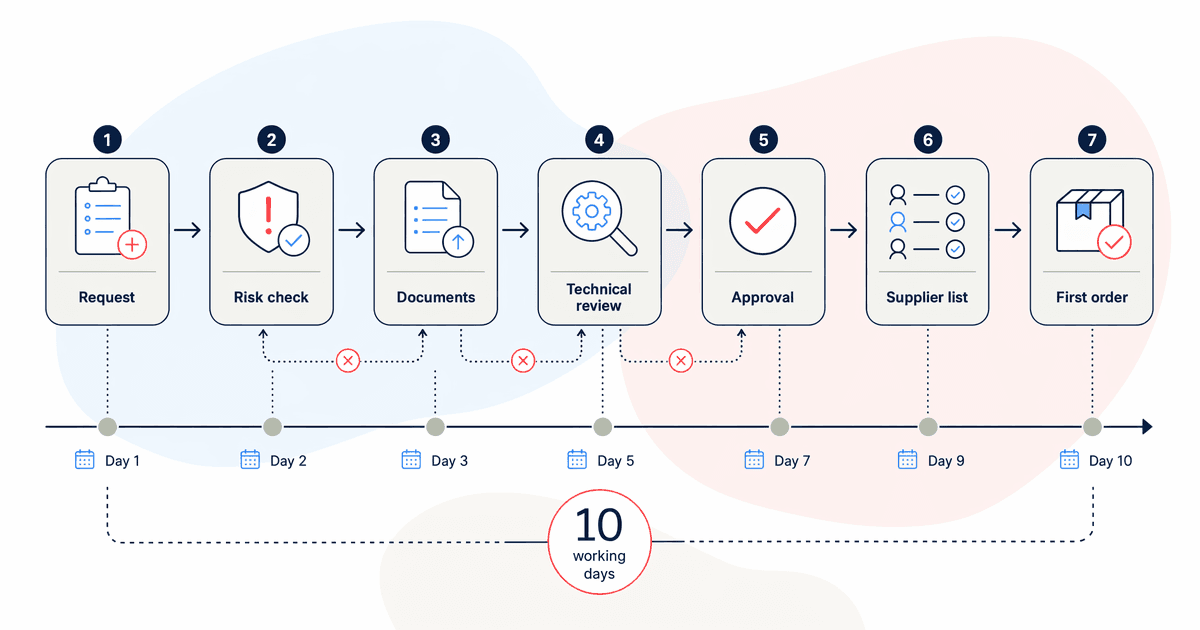
Every new supplier should follow an identical documented path. The goal: 10 working days from approval decision to first-order readiness. Without a checklist, new supplier onboarding stretches to 3-6 weeks because documents get stuck in email chains and nobody owns the follow-up.
The onboarding checklist
Here's the sequence. Each step has an owner and a target completion time:
- Request documentation pack (Day 1) - Send a standard email requesting: current BRCGS/SALSA certificate, product specifications, allergen declaration, insurance certificates, ethical trade statement
- Review BRCGS grade (Day 2-3) - Verify certificate against the BRCGS Directory. Grade C or D triggers additional risk assessment
- Approve or reject (Day 3-5) - Quality manager signs off. Rejection requires documented rationale
- Log in ASL (Day 5) - Add all details to your approved supplier list with expiry dates
- Agree specifications (Day 5-7) - Both parties sign off on product specs
- Confirm allergen status (Day 7-8) - Verify allergen handling meets your requirements
- First order clearance (Day 10) - Supplier cleared for ordering
Make it a template, not a memory exercise
The brands that struggle with onboarding aren't missing knowledge. They're missing a trigger. When a new supplier is identified, who starts the process? In our experience, the gap isn't between step 3 and step 4. It's between "someone mentions a potential supplier in a meeting" and step 1 actually happening. Assign a single owner. Make the trigger explicit: "When procurement identifies a new supplier, quality coordinator receives a checklist within 24 hours."
Build this as a checklist template in whatever tool your team actually uses daily. Trello card, Notion template, even a printed form. The format matters less than the consistency.
How do you store and retrieve supplier certificates?
When the BRCGS auditor asks "show me supplier X's certificate," you need to find it in under 2 minutes. That's the practical benchmark. Anything slower and you're creating an awkward silence while your quality manager searches through email attachments and shared drives.
Three storage approaches
Named folder structure in SharePoint or Google Drive (free). Create a consistent folder hierarchy:
/Suppliers/ /[Supplier Name]/ /Certificates/ BRCGS-Certificate-2026.pdf Insurance-PL-2026.pdf /Specifications/ Product-Spec-v3-2025.pdf /Allergen/ Allergen-Declaration-2026.pdf
The key word is consistent. Every supplier, same structure. No exceptions. No "I'll file it later."
Linked attachments in Airtable or Notion (£0-£50/month). Attach documents directly to the supplier record. When you open the ASL entry, all documents are right there. Faster retrieval, slightly more setup.
Dedicated document management system (£200+/month). Overkill for most brands at this scale unless you're managing 200+ suppliers across multiple sites.
The 2-minute retrieval test
Run this test quarterly. Pick 5 random suppliers. Can you pull up their current BRCGS certificate within 2 minutes for each? If not, your storage system needs fixing. It's a simple pass/fail that mirrors what happens on audit day.
practical guide to AI for FMCG
What ongoing monitoring do you need between renewals?
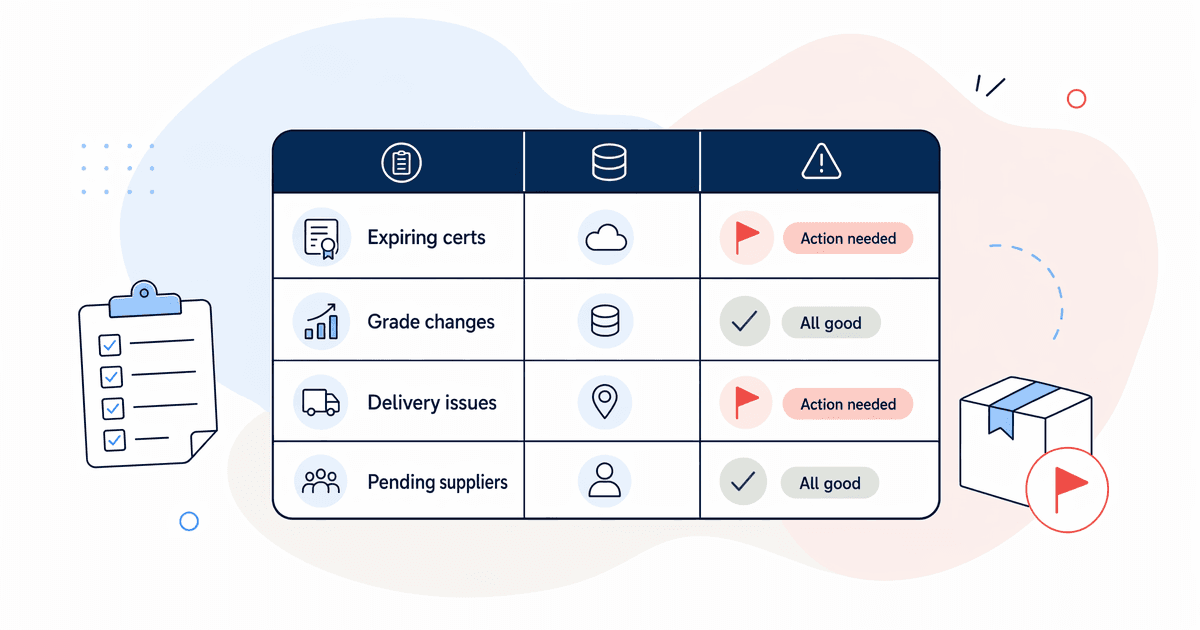
Certificate renewals happen annually, but risks don't wait 12 months. Between renewals, watch for three signals that indicate a supplier may need reassessment. Most monitoring at this scale is manual, but even quarterly reviews catch problems early.
Three signals to watch
BRCGS grade drops. If a supplier moves from AA to B, or from B to C, that changes their risk profile. Check the BRCGS Directory quarterly against your ASL. A downgrade doesn't automatically mean you drop the supplier, but it triggers a conversation.
Product recalls involving your ingredients. Subscribe to FSA food alerts and cross-reference against your supplier list. If a recall involves an ingredient you source, contact your supplier immediately for confirmation of impact.
Supplier financial distress. Late deliveries are often the first signal. If a supplier starts consistently delivering late, extending payment terms requests, or reducing minimum order quantities, these can indicate financial pressure that affects quality investment.
Quarterly supplier review
Block 30 minutes each quarter to review your ASL. Check:
- Any certificates expiring in the next 90 days?
- Any grade changes since last review?
- Any delivery performance issues flagged by procurement?
- Any new suppliers pending onboarding?
This isn't a formal supplier audit. It's a quick health check that stops problems compounding.
How does this help you pass your BRCGS audit?
BRCGS Food Safety Issue 9, clause 3.5, specifically requires documented procedures for supplier approval and monitoring. This is a common area for non-conformances because many brands have the knowledge but lack the documented evidence. L.E.K. Consulting found that 45% of brand owners now maintain connected data systems for compliance purposes (L.E.K. Consulting, April 2026). Your structured ASL satisfies this requirement.
Citation capsule: BRCGS Food Safety Issue 9 clause 3.5 requires documented supplier approval procedures and ongoing monitoring. Brands using structured approved supplier lists with automated expiry tracking can demonstrate compliance in under 2 minutes during audits, avoiding non-conformances that commonly arise from informal email-based supplier management.
What auditors expect to see
When a BRCGS auditor reviews clause 3.5, they're looking for evidence of:
- A current approved supplier list showing all active suppliers and their status
- Certificates within date for every supplier on the list
- A documented approval process showing how new suppliers are assessed
- Monitoring procedures for ongoing supplier performance
- Evidence of action when suppliers fall below standard (suspensions, increased checks)
If you've followed the steps in this guide, you can demonstrate all five within minutes. Open your ASL, show the traffic-light status, pull up a certificate from your folder structure, walk through your onboarding checklist, and show your quarterly review notes.
We've seen brands go from "minor non-conformance on clause 3.5" to "auditor spends 5 minutes on suppliers and moves on" within one audit cycle. The difference isn't new software. It's structure and consistency.
The payoff extends beyond passing audits. When your supplier data is structured and current, it feeds into other operational improvements. Connected supplier data supports purchase order automation, specification management, and eventually predictive supply chain work.
FAQ
How long should supplier onboarding take for a UK food manufacturer?
Target 10 working days from approval decision to first-order readiness. Most brands without a structured checklist take 3-6 weeks because documents languish in email threads. The bottleneck is usually waiting for the supplier to return their documentation pack, so send the request on day 1 with a clear deadline and follow up on day 5 if incomplete.
Do I need dedicated supplier management software for BRCGS compliance?
Not at the 30-150 supplier scale. A structured spreadsheet or Airtable base with automated expiry alerts satisfies BRCGS clause 3.5 requirements. Dedicated platforms like Safefood 360 (£100-£500/month) become worthwhile above 200 suppliers. The standard requires a documented process, not a specific technology.
What's the biggest risk of managing suppliers in spreadsheets?
Single points of failure. If the quality coordinator who maintains the spreadsheet leaves, knowledge walks out with them. Mitigate this by keeping the spreadsheet in a shared location with clear column headers, using a named folder structure for certificates, and documenting the process (who updates what, when) in a one-page SOP that anyone could follow.
Your next steps
Start this week. Don't wait for a perfect system.
- Audit your current state (1 hour). How many active suppliers do you have? Where does their documentation live? When did you last check expiry dates?
- Build your ASL structure (2-3 hours). Create the spreadsheet with the fields listed above. Populate it with your top 20 suppliers by volume.
- Set up alerts (1-2 hours). Even if it's just calendar reminders for now, get the next 90 days of expiries visible.
- Write your onboarding checklist (30 minutes). Document the steps. Assign an owner.
The entire foundation takes less than a day of focused work. From there, you're maintaining a system rather than rebuilding one every time an auditor visits.
What matters isn't the tool. It's the discipline. A well-maintained spreadsheet beats an expensive platform that nobody updates.