
The most common reason automation projects fail isn't the technology — it's that teams skip straight to building before they understand what they're automating. McKinsey's research on automation execution pitfalls puts it plainly: if processes are not reconfigured before automation, savings often prove elusive.
That's not a technology problem. It's a sequencing problem.
The businesses that get strong, durable returns from automation — Arnott's recovered 60+ hours of manual effort per week and reached ROI within 10 months — do the process work first. They map what actually happens, remove what shouldn't be there, standardise what varies arbitrarily, and only then build the automation. The technology is the easy part.
This is the six-step sequence that works. It applies whether you're automating a single report or an end-to-end order-to-cash flow.
TL;DR: Map the process before you touch any tooling. Automate the clean version, not the current one. Start with one high-volume, low-exception process. Measure from day one. Gartner found only 48% of digital initiatives meet their targets — the ones that do almost always did the process work upfront.
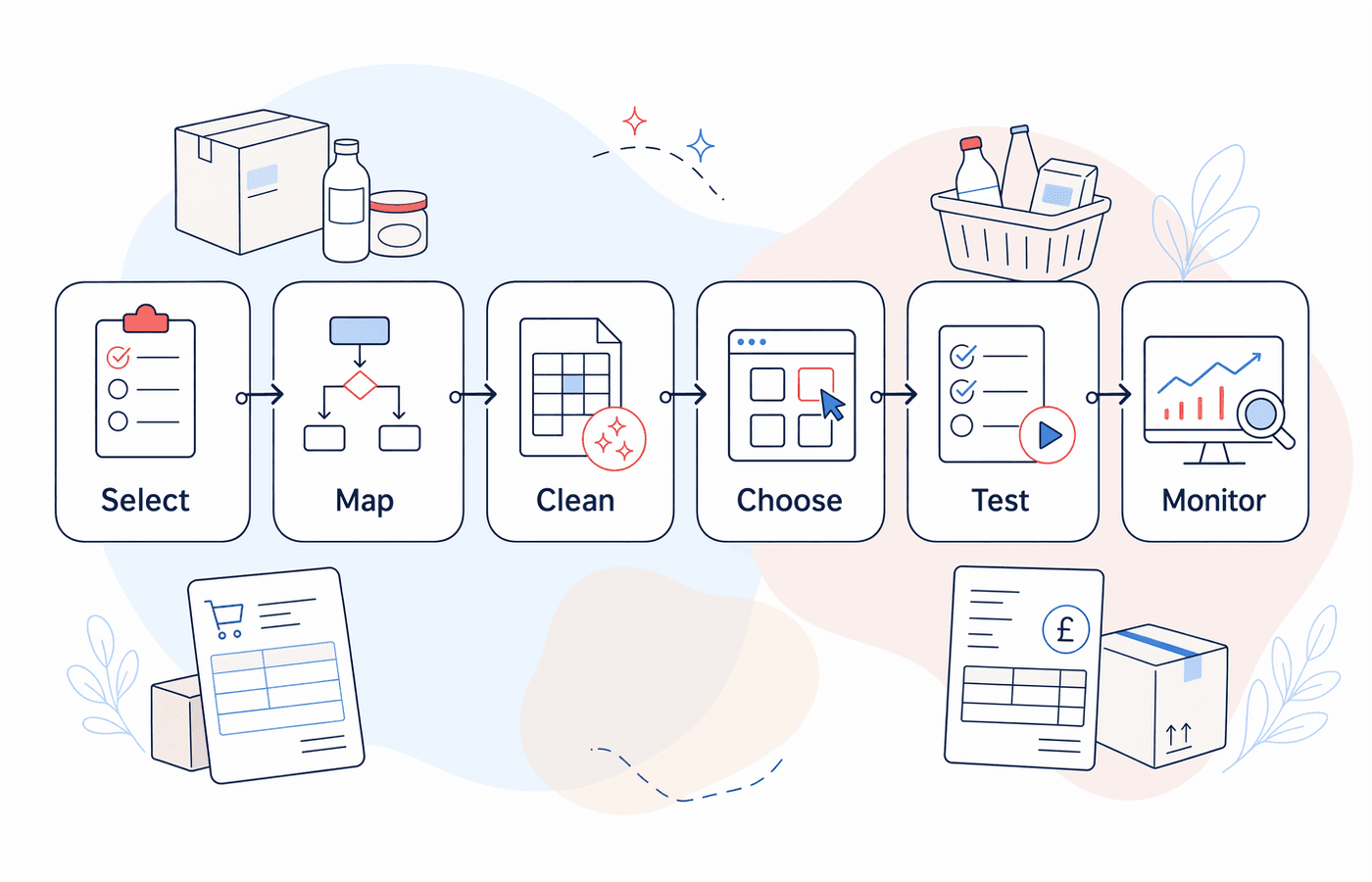
Step 1: Pick the Right Process First
Not every manual process is worth automating, and not every automation should happen at the same time. The ones to target first share three characteristics: they're high volume, they run on structured data, and they have few legitimate exceptions.
In an FMCG operation, that typically points to:
- Sales order processing — receiving customer orders by email or EDI and entering them into the ERP
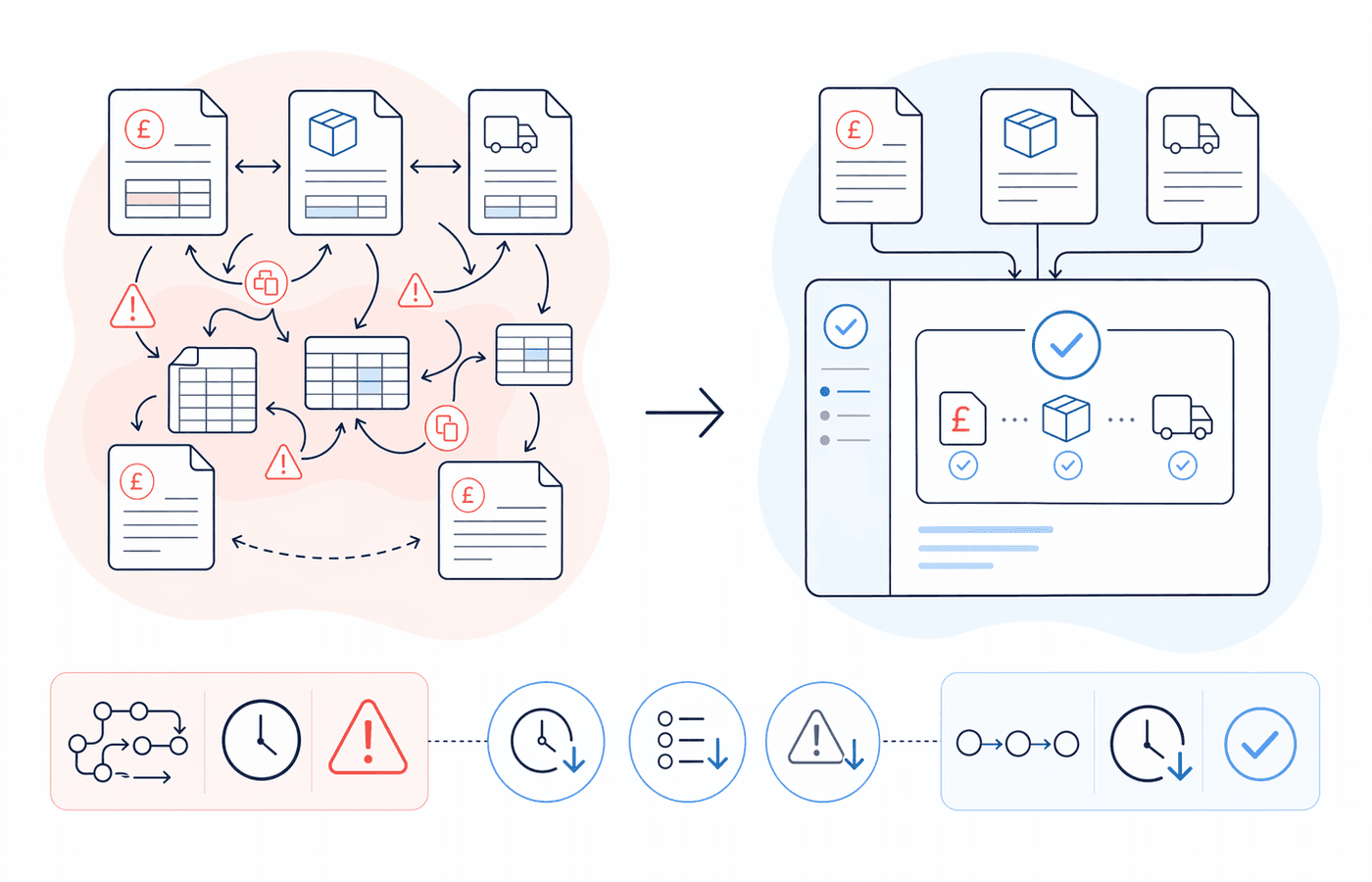
- Invoice matching — three-way matching of purchase orders, goods receipts, and supplier invoices
- Stock replenishment triggers — raising purchase orders when inventory falls below a set threshold
- Scheduled management reporting — pulling weekly or monthly data into a standard format
- Stock variance reporting — comparing physical counts against system records and flagging discrepancies
These processes share a common profile: the input is predictable, the rules are fixed, and the output is the same every time. That's the profile automation handles well.
Avoid starting with processes that carry a high proportion of exceptions, require human judgement to resolve, or depend on data that's inconsistent across systems. Those exist in most FMCG businesses — but they're a second or third phase of the automation programme, not the starting point.
A useful filter before committing: ask how often someone manually overrides, adjusts, or escalates a step in the process. If the answer is more than 10–15% of the time, it needs cleaning before it's ready to automate.
Step 2: Map the Process Before You Touch Any Tooling
This is the step most teams skip. It's also the step that determines whether the automation succeeds.
Process mapping means walking the workflow end-to-end with the people who actually do it — not a manager's description of how it should work, but a direct account of what happens in practice. Document every input, every output, every decision point, and every exception. Include the workarounds people have built over time, because those workarounds usually signal either a flaw in the original process design or a gap in the systems it runs across.
McKinsey's Lighthouse research found that leading manufacturers invest roughly four times as much in process and people enablers as they do in new technology. For every £2 spent on a new tool, they put £4 into the process and change work around it. That ratio looks conservative until you've watched a well-funded automation project collapse because nobody mapped the eight edge cases the team had been handling manually every Friday afternoon.
The output of this step should be a simple flow diagram — input, steps, decisions, outputs, exceptions — that any new team member could follow without asking questions. If you can't produce that, the process isn't ready to automate.
Step 3: Clean the Process
Automation amplifies whatever the process does — including its flaws. Automating a broken workflow doesn't fix it; it just makes the same mistakes faster and at greater volume.
Before building anything, work through the mapped process and remove what shouldn't be there:
Remove unnecessary steps. If a step exists because it was added to catch an error that the system should handle, fix the system rather than preserving the step. If it exists because of a reporting requirement that changed two years ago, take it out.
Standardise inputs. Automation struggles with variability. If customer orders arrive in six different formats — EDI, email PDF, emailed Excel, handwritten fax, portal submission, phone call logged manually — decide which formats the automated system will handle and build a clear process for the others. Arnott's started this way: they automated the standardised order formats and built a separate exception path for the rest. The result was 75% of manual orders processed digitally within months of go-live.
Document exception handling explicitly. Every process has exceptions. The question is whether they're handled consistently. If three different people resolve the same type of exception three different ways, the automation will need a rulebook before it can handle them. Write that rulebook now.
The cleaned process — not the current one — is what you're automating.
Step 4: Choose Your Automation Approach
The right tool depends on what the process involves. This is where the choice of technology actually matters, and where vendors will try to sell you something more complex than you need.
| Process type | Appropriate approach |
| Moving data between existing systems (ERP, spreadsheets, portals) | RPA (Robotic Process Automation) |
| Routing approvals, tasks, and notifications between people | Workflow / BPM software |
| Connecting modern platforms via direct integration | API integration |
| Extracting data from PDFs, emails, or scanned documents | Document AI / IDP |
| Combining multiple steps across systems | RPA + workflow orchestration |
For most FMCG businesses starting out, the practical choice is between RPA tools (UiPath, Microsoft Power Automate, Automation Anywhere) and workflow platforms (Microsoft Power Automate, Make, or similar). Low-code platforms can handle a wider range of processes than most teams expect — including order processing, invoice routing, and stock reporting — without custom development.
Where custom development becomes necessary is typically when the integration involves a heavily customised SAP environment, a bespoke ERP with no API layer, or a workflow with complex conditional logic that low-code tools handle clumsily.
If you're unsure which approach fits your process, the output of Step 2 — the process map — is exactly what an implementation partner needs to give you an honest answer.
Step 5: Build Lean and Test With Real Data
Build the happy path first. The happy path is the process as it runs when everything works as expected — the standard order, the clean invoice, the straightforward replenishment trigger. Get that working reliably before you build the exception handling.
This matters because exception handling is where complexity accumulates. Every additional exception path you add to an automation before the core is proven is technical debt you'll maintain indefinitely. Build it in phases: core flow first, then the high-frequency exceptions, then the edge cases.
Test with real production data, not sanitised samples. The gaps between a clean test dataset and actual production inputs are exactly where automations break in live use. Real orders contain typos, mismatched product codes, and formatting that doesn't match the spec. Real invoices have rounding errors and missing fields. Testing on real data surfaces those problems before they become a live failure.
Run the automation in parallel with the manual process during the testing phase. This means doing the work twice temporarily, but it gives you a direct comparison — output from the automation against output from the manual process — that identifies discrepancies before you switch off the manual fallback.
Step 6: Monitor, Measure, and Iterate
Define your success metrics before launch. If you don't know what good looks like before the automation goes live, you won't be able to tell whether it's working after.
The metrics worth tracking from day one:
- Processing time — how long the automated process takes versus the manual baseline
- Error rate — percentage of transactions requiring manual correction or re-processing
- Exception volume — how many cases fall outside the automated flow and why
- Throughput — volume processed per day or week
Coca-Cola European Partners' automation programme tracked these across 450 automations. The result: 580,000 hours returned to the business, €17 million saved, and an 80% reduction in error rates — with customer order processing 99% faster than the manual equivalent. Those numbers didn't come from deploying software. They came from running a disciplined programme with clear metrics and continuous iteration over seven years.
For a single process rather than an enterprise programme, the same logic applies at smaller scale. A well-monitored automation surfaces improvement opportunities over time. An unmonitored one silently accumulates exceptions that get resolved manually — and nobody notices until the error backlog is weeks deep.
Set a monthly review cadence for any live automation in the first six months. Check exception rates, update rules when business logic changes, and document any manual interventions. That discipline is what separates a process that pays back indefinitely from one that degrades quietly until someone switches it off.
FAQ
Which manual processes are easiest to automate in an FMCG business?
The easiest to automate are high-volume, rules-based processes that run on structured data and have few exceptions: sales order processing, invoice matching, stock replenishment triggers, and scheduled reporting. These have clear inputs and outputs, defined rules, and little need for human judgement. Invoice processing is a particularly common starting point — Forrester 2024 data documents a 93% efficiency gain, from 12 minutes to 45 seconds per invoice — though the exact figures vary significantly by operation. [VERIFY — Forrester 2024, cited via third-party source]
How long does it take to automate a manual process?
A well-scoped, simple automation — a reorder trigger or a weekly report — can be live in two to four weeks. A more complex workflow like invoice processing with multi-level approvals typically takes six to twelve weeks. The variable that most affects timeline is how long it takes to map and clean the process before the build begins. Teams that do that work properly upfront move faster, not slower.
What's the biggest reason automation projects fail?
Automating a broken or poorly understood process. McKinsey's research is direct: if processes are not reconfigured before automation, savings often prove elusive. Teams rush to build before they've mapped what they're building — and end up with a faster version of a process that was already wrong. Gartner's 2024 survey found only 48% of digital initiatives meet or exceed their targets. Process mapping is the most consistently underinvested part of the work.
Do we need a developer to automate a manual process?
Not always. Low-code platforms like Power Automate, Make, or UiPath StudioX handle a wide range of FMCG workflows without custom development. More complex integrations — particularly anything involving a heavily customised SAP or bespoke ERP — typically require a developer or an implementation partner with the relevant system expertise. The process map from Step 2 is the clearest way to find out: if every step connects to systems with standard APIs or UI interactions, low-code is probably sufficient. If you're dealing with legacy systems, custom data models, or complex conditional logic, get a technical assessment before committing.
The Bottom Line
The six-step sequence works because it puts the process work before the technology work — which is the opposite of how most teams approach it.
- Pick one high-volume, low-exception process to start. Sales order processing, invoice matching, and stock replenishment are the usual first candidates in an FMCG operation.
- Map the real process, not the documented one. Walk it with the people who do it and capture every step, decision, and exception.
- Clean it before you build. Remove unnecessary steps, standardise inputs, and write the rulebook for exceptions. Automate the clean version.
- Match the tool to the task. RPA for system-to-system data movement, workflow software for approvals, document AI for PDFs and emails. Low-code handles more than most teams expect.
- Build the happy path first, test on real production data, and run in parallel until you trust the output.
- Monitor from day one. Set success metrics before launch. Monthly reviews in the first six months. Iterate when business logic changes.
Arnott's recovered 60+ hours of manual effort per week from their first automation. CCEP returned 580,000 hours to the business across a seven-year programme. Both started with a single, well-scoped process — and did the process work before the technology work.
Want to work out which process to automate first? Book an intro call →
Sources: [McKinsey Digital — How to Avoid the Three Common Execution Pitfalls That Derail Automation Programs](https://www.mckinsey.com/~/media/McKinsey/Business%20Functions/McKinsey%20Digital/Our%20Insights/How%20to%20avoid%20the%20three%20common%20execution%20pitfalls%20that%20derail%20automation-programs/How-to-avoid-the-three-common-execution-pitfalls-that-derail-automation-programs.pdf); [McKinsey Operations — Lighthouse Lessons: Four Mindsets to Make Digital Transformation Stick (April 2025)](https://www.mckinsey.com/capabilities/operations/our-insights/lighthouse-lessons-four-mindsets-to-make-digital-transformation-stick); [Gartner — Only 48% of Digital Initiatives Meet or Exceed Targets (October 2024)](https://www.gartner.com/en/newsroom/press-releases/2024-10-22-gartner-survey-reveals-that-only-48-percent-of-digital-initiatives-meet-or-exceed-their-business-outcome-targets); [Ashling Partners / UiPath — Arnott's Automation Case Study (2025)](https://ashling.ai/resources/arnotts-recipe-for-automation-success); [SS&C Blue Prism — Coca-Cola European Partners Case Study (2025)](https://www.blueprism.com/resources/case-studies/coca-cola-partners-intelligent-automation-transformation/); Forrester 2024 invoice processing efficiency data — cited via Duvo.ai [VERIFY — direct Forrester report URL needed].
About the author: BazBiff works with FMCG brands on AI strategy, workflow automation, and supply chain intelligence. Every article is written from direct implementation experience — not vendor slides. Learn more about BazBiff →