
Someone from Tesco asks for your product's updated allergen statement. Your NPD manager checks one spreadsheet. Your technical lead checks the spec database. The commercial team pulls a different version from the retailer portal. Twenty minutes later, nobody's sure which version is current.
This happens daily at brands with 100-500 SKUs. Product data lives in 4-8 different places, and the "source of truth" depends on who you ask. According to L.E.K. Consulting (April 2026), 45% of brand owners have already implemented smart connected packaging, rising to 88% by 2028. Every one of those initiatives demands structured, centralised product data as its foundation.
You don't need a £50,000 PIM system to fix this. You need a lightweight product data master, built in under a week, using tools you already have.
The Bottom Line - A structured product data master takes 3-5 days to build and costs under £50/month - Start with 20 core fields, not all fields. Add complexity later. - The critical rule: one authoritative source per data field, no exceptions - Only 18% of CPG brands scale AI initiatives beyond pilots (BCG, 2026), and data foundations are the separating factor
What's the Actual Product Data Problem at This Scale?
UK food and drink brands between £20m and £150m revenue typically manage 100-500 active SKUs. Each SKU carries at least 30 data attributes across regulatory, commercial, and logistics categories. According to BCG (June 2026), data foundations separate the 18% of CPG companies that scale AI from the 75% stuck in pilots.
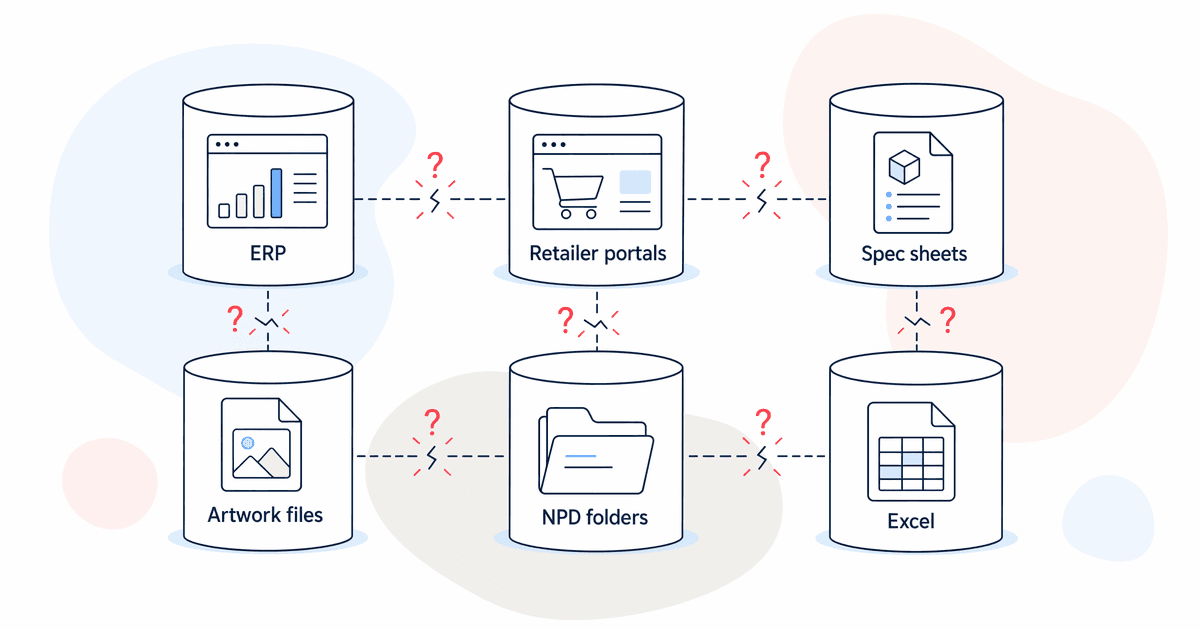
The pattern we see most often: product data scattered across ERP (barcodes, weights), retailer portals (GDSN attributes), technical spec sheets (allergens, ingredients), artwork files (pack copy), NPD folders (nutritionals from lab certificates), and at least two Excel files that "someone maintains."
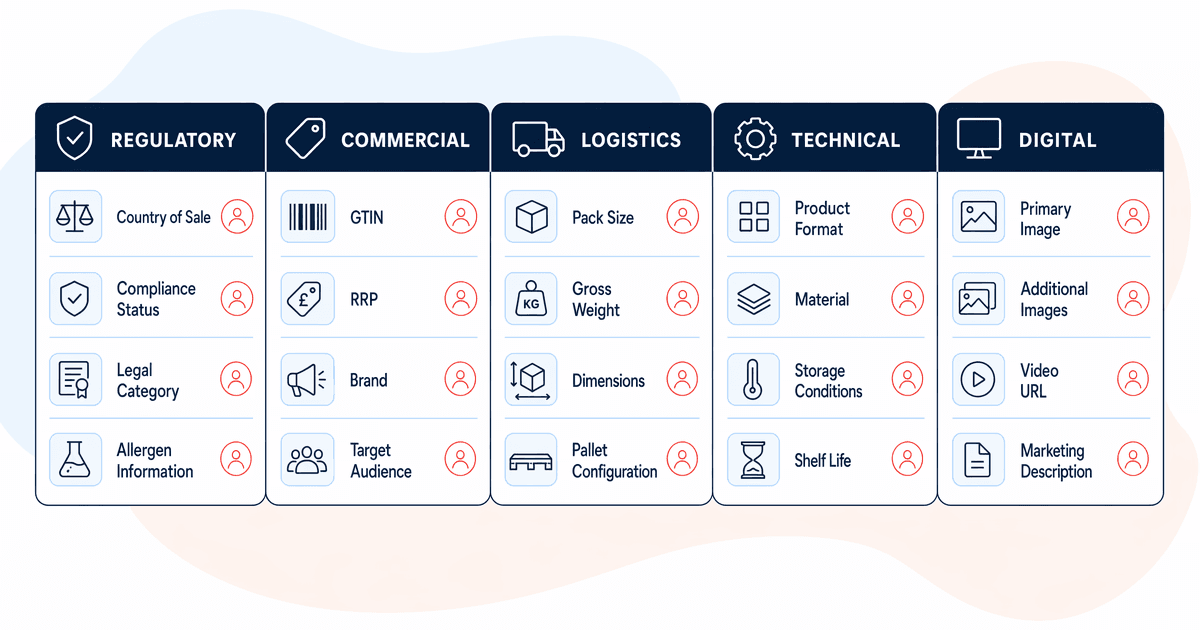
Each SKU needs these categories of data managed somewhere:
- Regulatory: ingredients, 14 declarable allergens, nutritional values per 100g, country of origin
- Commercial: product name, case configuration, pricing tiers, promotional descriptions
- Logistics: EAN, case GTIN, unit weight, case weight, pallet configuration, shelf life, storage conditions
- Technical: certifications (BRC, organic, kosher, halal), last technical approval date, spec version
- Digital: pack shots, product descriptions, retailer-specific attributes
Nobody's hired a "product data manager" yet. The work gets split between NPD, technical, commercial, and supply chain teams. Nobody owns the whole picture.
Citation capsule: UK food and drink brands with 100-500 SKUs typically store product data across 4-8 systems with no single owner, according to BazBiff's client assessments. BCG (June 2026) found data foundations separate the 18% of CPG firms scaling AI from the 75% stuck in pilots.
What Does a PIM Do, and Why Is It Premature for Most?
PIM (Product Information Management) systems like Akeneo, Salsify, and inRiver centralise product data across channels. They cost £15,000-£80,000+ per year and take 2-4 months to implement properly. For most growing UK food and drink brands, this investment is premature.
When a PIM makes sense
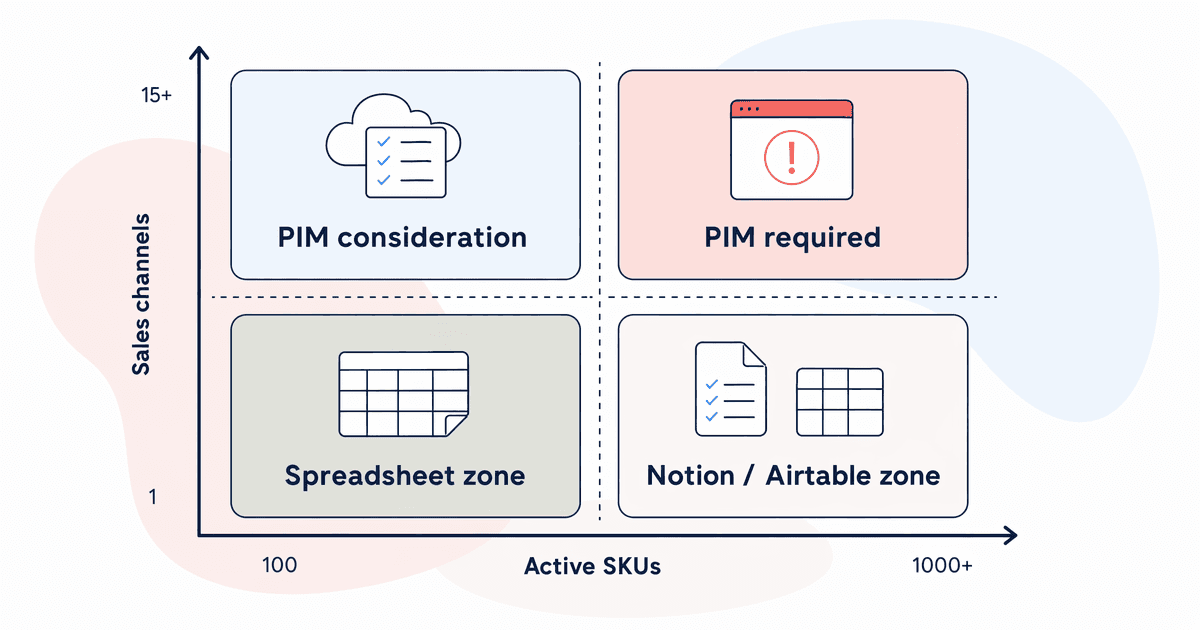
A PIM earns its keep when you're managing 500+ active SKUs, selling into 10+ channels with different data format requirements, operating across multiple markets requiring localised data, or when retailer data requests consume more than one day per week of someone's time.
When a PIM is overkill
At 100-300 SKUs with 3-5 retail customers, a well-structured spreadsheet or Notion database does the same job at 1/50th of the cost. We've seen brands buy Akeneo licences at £25,000/year, then spend six months on implementation, only to realise their actual problem was process, not tooling.
In our experience, the brands that get the most from a PIM are those that first built a lightweight data master and outgrew it. They know exactly what fields matter, what their change control process looks like, and where the pain points are. Buying a PIM without that foundation means you're paying to organise a mess.
Step 1: How Do You Define Your Core Data Fields?
Start with 20 fields, not 200. The table below covers the essential product data for a UK food and drink brand selling into major grocery retailers. You can add complexity later, but these 20 fields handle 90% of retailer data requests and internal queries.
This field list comes from mapping the common data requirements across Tesco, Sainsbury's, Morrisons, and Co-op supplier portals, cross-referenced with GS1 UK's recommended GDSN attributes for food products.
Core field checklist
| # | Field Name | Data Type | Authoritative Source | Update Frequency |
| 1 | Product name (legal) | Text | Artwork/regulatory | On reformulation |
| 2 | EAN (unit barcode) | Number (13-digit) | ERP/GS1 | On new listing |
| 3 | Case GTIN | Number (14-digit) | ERP/GS1 | On new listing |
| 4 | Case configuration | Text (e.g. 6x400g) | Supply chain | On pack change |
| 5 | Unit net weight | Number + unit | Technical spec | On reformulation |
| 6 | Case gross weight | Number + unit | Logistics/warehouse | On pack change |
| 7 | Ingredients (UK format) | Long text | Formulation master (NPD) | On reformulation |
| 8 | Allergens (14 declarable) | Multi-select | Technical spec database | On reformulation |
| 9 | Nutritionals per 100g | Structured (kJ, fat, sat fat, carbs, sugars, fibre, protein, salt) | Lab certificate | On reformulation |
| 10 | Shelf life (days) | Number | Technical/quality | Annual review |
| 11 | Storage conditions | Dropdown (ambient/chilled/frozen) | Technical spec | On change |
| 12 | Country of origin | Text | Procurement/supplier | On supplier change |
| 13 | Certifications held | Multi-select (BRC, organic, kosher, halal, etc.) | Quality team | Annual audit |
| 14 | Primary pack shot filename | Text/URL | Marketing/design | On artwork change |
| 15 | Last technical approval date | Date | Quality/technical | On any spec change |
| 16 | Pallet configuration (TiHi) | Text (e.g. 8x5) | Logistics | On pack change |
| 17 | Min order quantity | Number | Commercial | Quarterly review |
| 18 | RRP (exc. VAT) | Currency | Commercial | On price change |
| 19 | Product status | Dropdown (active/NPD/delisted) | Commercial | On change |
| 20 | GDSN publication status | Dropdown (published/pending/not required) | Technical/GS1 | On data sync |
Don't be tempted to add "nice to have" fields yet. Every field you add is a field someone has to maintain. Start lean, prove the process works, then expand.
Step 2: Which Tool Should You Use for Your FMCG Product Data Master?
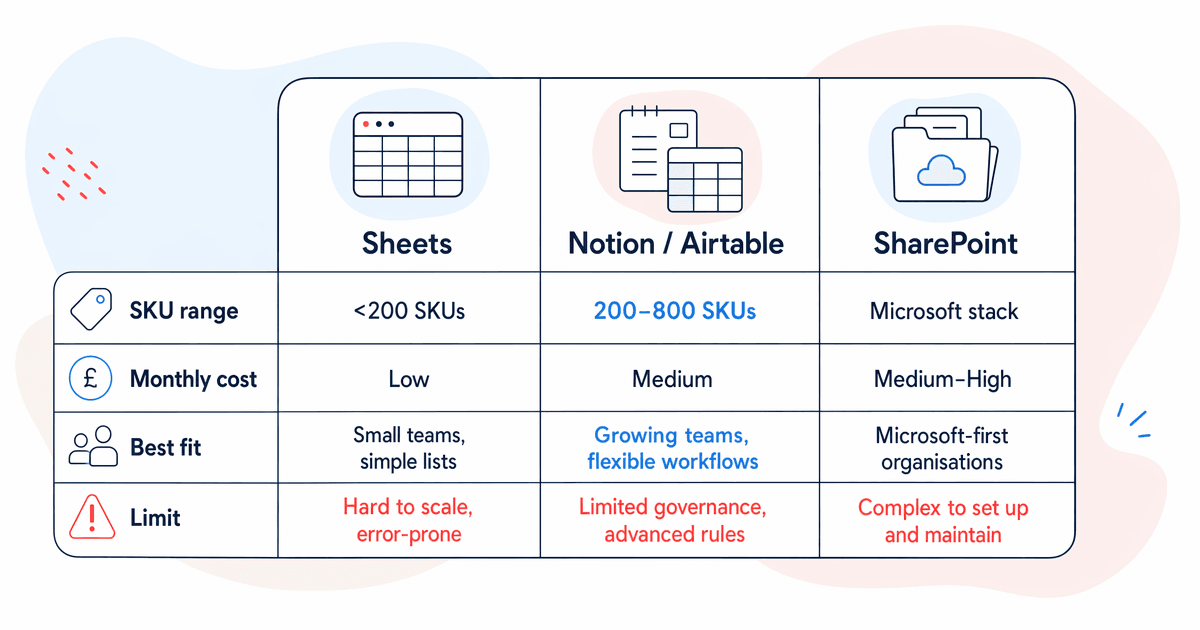
The right tool depends on your SKU count, team size, and existing tech stack. In our experience, most brands overthink this decision. Pick the one your team will actually use, not the one with the best features list.
Option A: Google Sheets or Excel Online (free)
Best for brands with fewer than 200 active SKUs. Set up column validation, dropdown lists for controlled fields (allergens, storage conditions, certifications), and conditional formatting to flag missing data. Share with view-only access by default, edit access only for field owners.
Limitations: no relational data, file attachments are clunky, version history gets messy with multiple editors.
Option B: Notion or Airtable (£20-£50/month)
Better for 200-500 SKUs. Relational databases let you link products to suppliers, certifications to audit dates, and specs to approval records. Filtered views mean the technical team sees their fields, commercial sees theirs. File attachments work properly.
Limitations: learning curve for non-technical team members, some export limitations for retailer template formats.
Option C: SharePoint list (included in Microsoft 365)
Good if your business already runs on Microsoft. You can build data entry forms in Power Apps, set up Power Automate flows to alert field owners when updates are needed, and integrate with Teams for notifications. Familiar interface for most office-based staff.
Limitations: less flexible filtering than Airtable, requires some Power Platform knowledge to set up well.
Citation capsule: L.E.K. Consulting (April 2026) reports 45% of brand owners have implemented smart connected packaging, rising to 88% by 2028. Every connected packaging initiative requires structured product data, making a centralised data master foundational regardless of tool choice.
Step 3: How Do You Establish One Authoritative Source Per Field?
This is the single most important rule in product data management. For each data field, one system is the master. Every other copy is downstream. When there's a conflict, the authoritative source wins. No discussion.
Most product data problems aren't caused by bad data entry. They're caused by the same data living in multiple places with no clear hierarchy. When your ERP says shelf life is 12 months but the retailer portal says 9 months, which one is correct? If you can't answer that question instantly for every field, you don't have a data master. You have a collection of spreadsheets.
Example ownership map
- Ingredients and allergens: formulation master, owned by NPD/technical
- Barcodes (EAN/GTIN): ERP, owned by supply chain
- Nutritionals: lab certificates, owned by quality/technical
- Weights and dimensions: warehouse measurements, owned by logistics
- Pack shots and product copy: DAM/marketing folder, owned by brand team
- Pricing: ERP or commercial pricing sheet, owned by commercial
- Certifications: quality management system, owned by quality team
Write this ownership map down. Put it in the header of your data master. Make sure every team member knows where to look for the "real" version of any field.
Has a supplier changed? The procurement team updates the master. Has a formulation changed? NPD updates ingredients and flags downstream systems. The rule is simple: one field, one owner, one source.
Step 4: What Does a Practical Change Control Process Look Like?
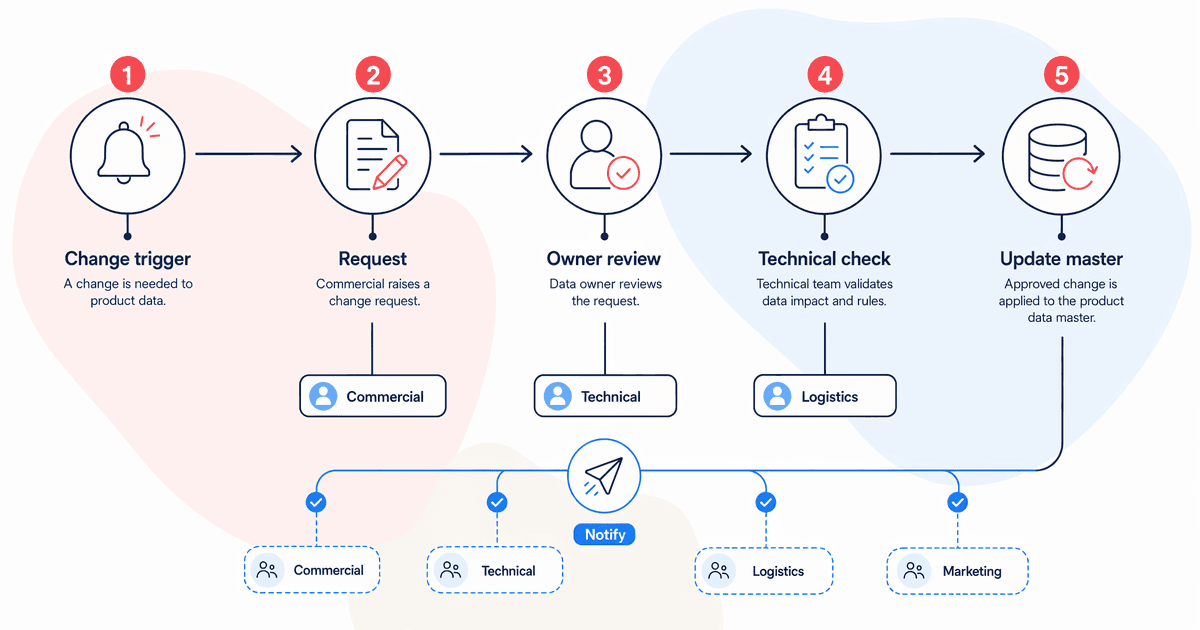
When an ingredient changes, whether from a reformulation, supplier switch, or regulatory update, a chain of data updates follows. This doesn't need to be automated on day one. It needs to be documented and followed consistently.
Minimum viable change control
- Log the change: what changed, when, why, who approved it
- Update the master: the field owner updates the authoritative source
- Flag downstream impacts: which other systems need updating? Retailer portals, labels, website product pages, marketing materials
- Notify affected teams: a simple email or Teams message to the people responsible for downstream systems
- Confirm completion: someone checks that all downstream updates happened
That's it. Five steps. You can run this in a shared spreadsheet with a "change log" tab, a Trello board, or even a recurring 15-minute weekly check-in.
We've seen brands try to automate change control before they've documented the process manually. It never works. Spend 8-12 weeks running the process by hand first. You'll discover edge cases, team handoff gaps, and timing dependencies that no automation tool would have captured on day one.
What triggers a change?
- Reformulation (ingredient or recipe change)
- Supplier switch (country of origin, certification status may change)
- Pack redesign (weights, dimensions, case config, artwork)
- Regulatory update (new allergen requirements, labelling rules)
- Pricing change (RRP, promotional pricing tiers)
- Certification renewal or lapse
Each trigger has a different set of affected fields. Map these out once and you'll save hours of "did we update everything?" anxiety on every change.
Step 5: How Do You Connect Your Data Master to Retailer Requirements?
Retailers ask for product data in specific formats. Tesco has different template fields than Sainsbury's. GS1/GDSN attributes follow a defined standard. Your product data master needs to map cleanly to these outputs so that when a retailer asks for an update, you pull from one place instead of five.
Practical mapping approach
Create a "retailer mapping" tab or view in your data master. For each retailer template field, note:
- Which of your 20 core fields maps to it
- Any formatting differences (e.g., allergens as a comma-separated list vs. individual Yes/No fields)
- Fields the retailer requires that you don't currently track (add these to your master)
Most UK grocery retailers ask for broadly similar data, mapped to GS1 standards. Once you've done the mapping exercise for one retailer, 70-80% carries over to the next.
Common retailer data pain points
Retailer-specific product descriptions with character limits. Pack shot specifications (dimensions, resolution, file format). Promotional calendar data linked to specific SKUs. GDSN publication and synchronisation status.
Build these into your master as optional fields. They're not part of the core 20, but they sit alongside them and pull from the same authoritative sources.
Citation capsule: According to L.E.K. Consulting (April 2026), smart connected packaging adoption among brand owners has reached 45%, rising to 88% by 2028. Structured retailer data mapping is a prerequisite for connected packaging, digital product passports, and QR-code-based consumer engagement.
practical guide to AI for FMCG
When Should You Upgrade to a Full PIM System?
The signals are clear. You need a PIM when your lightweight data master starts creating friction rather than reducing it. Specifically: more than 500 active SKUs, 5+ sales channels with different data format requirements, multiple markets requiring localised product data, or frequent retailer data requests consuming more than one day per week of someone's time.
The cost-benefit threshold
A PIM at £25,000/year makes sense when the time savings exceed the cost. If your team spends 8+ hours per week on manual data formatting and distribution across channels, that's roughly £20,000-£30,000 in annual salary cost. A PIM pays for itself at that point.
Below that threshold, you're paying for software complexity you don't need. The lightweight data master we've described handles the workload.
Preparing for the upgrade
The good news: building a lightweight data master first means your PIM implementation will be faster and cheaper. You'll already know your core fields, ownership rules, change control process, and retailer mappings. PIM vendors love customers who arrive with clean, documented data. They charge more for customers who arrive with a mess.
FAQ
How long does it take to build a product data master from scratch?
Most brands complete their initial setup in 3-5 working days. This covers defining the 20 core fields, choosing the tool, populating data for existing SKUs, and documenting field ownership. The ongoing maintenance, typically 2-3 hours per week, keeps it current.
Can a product data master replace proper data governance?
Not entirely. A data master is one component of data governance. You still need clear ownership, change control processes, and regular data quality reviews. But it's the practical starting point. According to BCG (June 2026), data foundations are what separate the 18% of CPG companies that scale AI from the 75% stuck in pilots.
What happens when two teams disagree about which data version is correct?
This is exactly why the "one authoritative source per field" rule matters. If the rule is documented and agreed, disputes resolve immediately: the authoritative source wins. If you haven't established this rule, every disagreement becomes a meeting. Document field ownership on day one.
What to Do This Week
Stop waiting for a PIM budget that may never arrive. The brands scaling fastest aren't the ones with the most expensive tools. They're the ones with clean, structured, accessible data, even if it lives in a Google Sheet.
Pick your tool. Define your 20 core fields. Assign ownership. Document your change control process. The whole thing takes a week. Next month, when a retailer asks for updated product data, you'll pull it from one place in two minutes instead of five places in twenty.
L.E.K. Consulting (April 2026) reports that 88% of brand owners will have smart connected packaging by 2028. That infrastructure requires structured product data. Start building yours now, before the deadline finds you.